
Looking for the SWIRL Enterprise MCP setup? The Enterprise MCP server has a different feature set and deployment model. See the MCP Server (Enterprise) guide.
MCP Server for SWIRL Community
Using Claude? The SWIRL Plugin for Claude Code includes a guided MCP hookup (/swirl:mcp) that connects Claude to this server and verifies it end to end.
The Claude CLI connected to SWIRL over MCP: list sources, federate a search, and get a grounded, cited answer from the terminal. (With narration.)
swirl-mcp-server is the official open-source Model Context Protocol server for SWIRL Community Edition. It exposes SWIRL's federated search and RAG capabilities as MCP tools, so Claude Desktop, Claude Code, Cursor, and any other MCP-compatible client can answer questions against your private data sources - SharePoint, Confluence, GitHub, Jira, Elastic, BigQuery, Snowflake, MongoDB, Microsoft 365, and 100+ more - without moving any data.
Overview
The server is a thin async adapter over SWIRL's existing REST API. No changes to your SWIRL deployment are required - install the MCP server alongside an existing SWIRL instance and the relationship is one-directional REST.
- Search where your data lives. SWIRL queries each connector in parallel, federates the results, and re-ranks them with cosine relevancy - no ETL, no data movement, and no copy of your content.
- One tool call, one answer.
search(query="...", rag=true)returns a generated answer with citations. The model never has to orchestrate per-source plumbing. - Permission-aware. SWIRL enforces per-user ACLs on every search and result. The MCP server forwards the user's credentials and never widens that scope.
- Drop-in. Works with a current SWIRL Community deployment.
System Requirements
| Component | Tested versions |
|---|---|
| Python | 3.10, 3.11, 3.12 |
| SWIRL Community Edition | Current main of swirlai/swirl-search |
| MCP Python SDK | 1.x |
| OS | macOS, Linux, Windows (WSL2) |
For RAG (rag=true): SWIRL itself needs an OpenAI or Azure OpenAI key. Paste it into the matching AIProvider record at /admin/swirl/aiprovider/ - see Enabling RAG below. The MCP server itself never sees the key. Plain search works without one.
Installation
Install from GitHub:
pipx install git+https://github.com/swirlai/swirl-mcp-server
That puts the swirl-mcp executable on your PATH. (Don't have pipx? python -m pip install --user pipx && pipx ensurepath.)
Enabling RAG
RAG calls (the rag_answer tool, or search with rag=true) route through a SWIRL AIProvider record. SWIRL Community ships with OpenAI and Azure/OpenAI AIProvider records preloaded - you only need to drop your API key into the matching record.
- Open the Administration Console at
http://localhost:8000/admin/swirl/aiprovider/and sign in. - You'll see the preloaded AIProvider records:
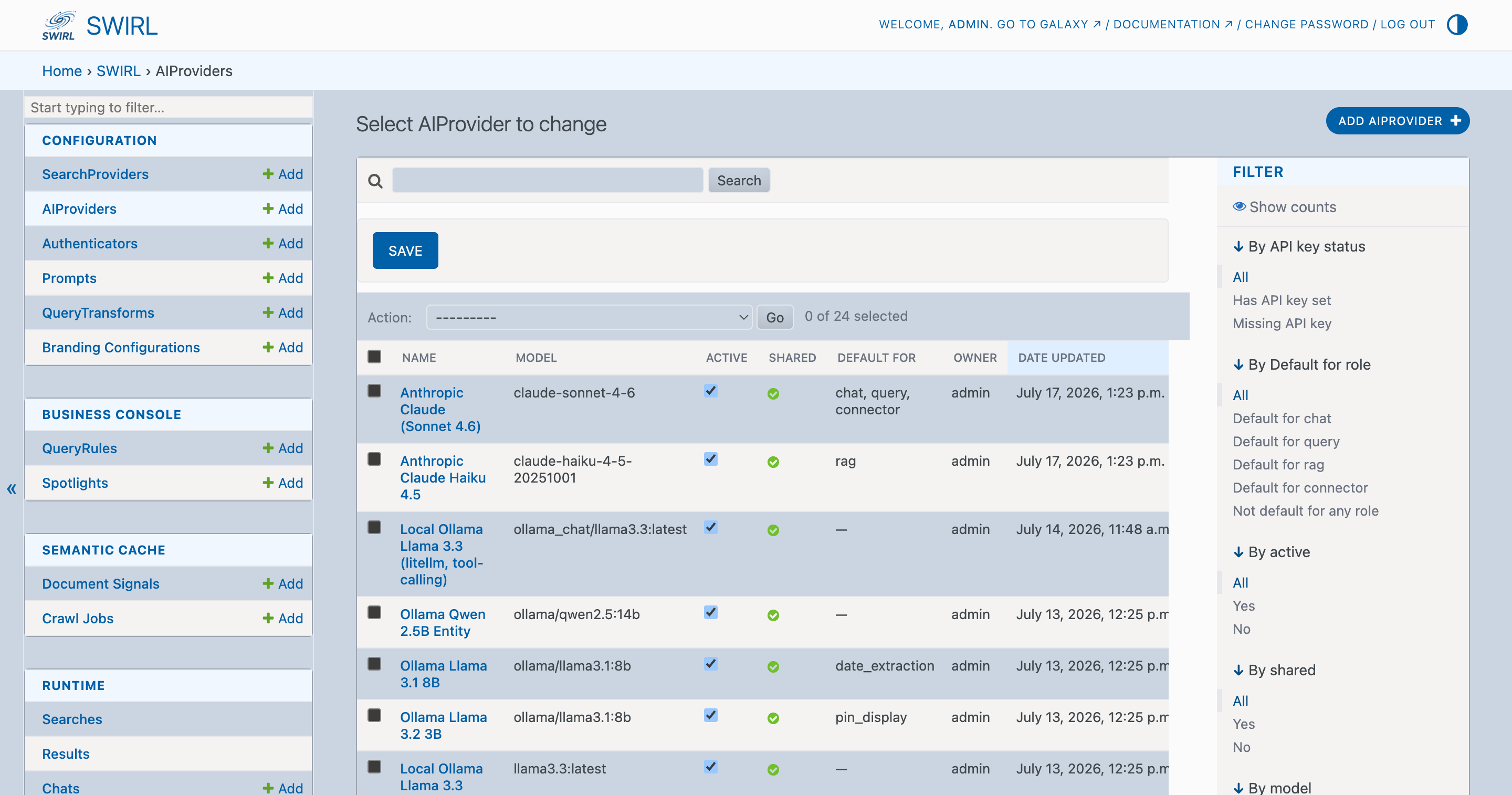
- Click the AIProvider you want to use (
OpenAIfor most setups,Azure/OpenAIif you're routing through Azure), paste your API key into theapi_keyfield, and save.
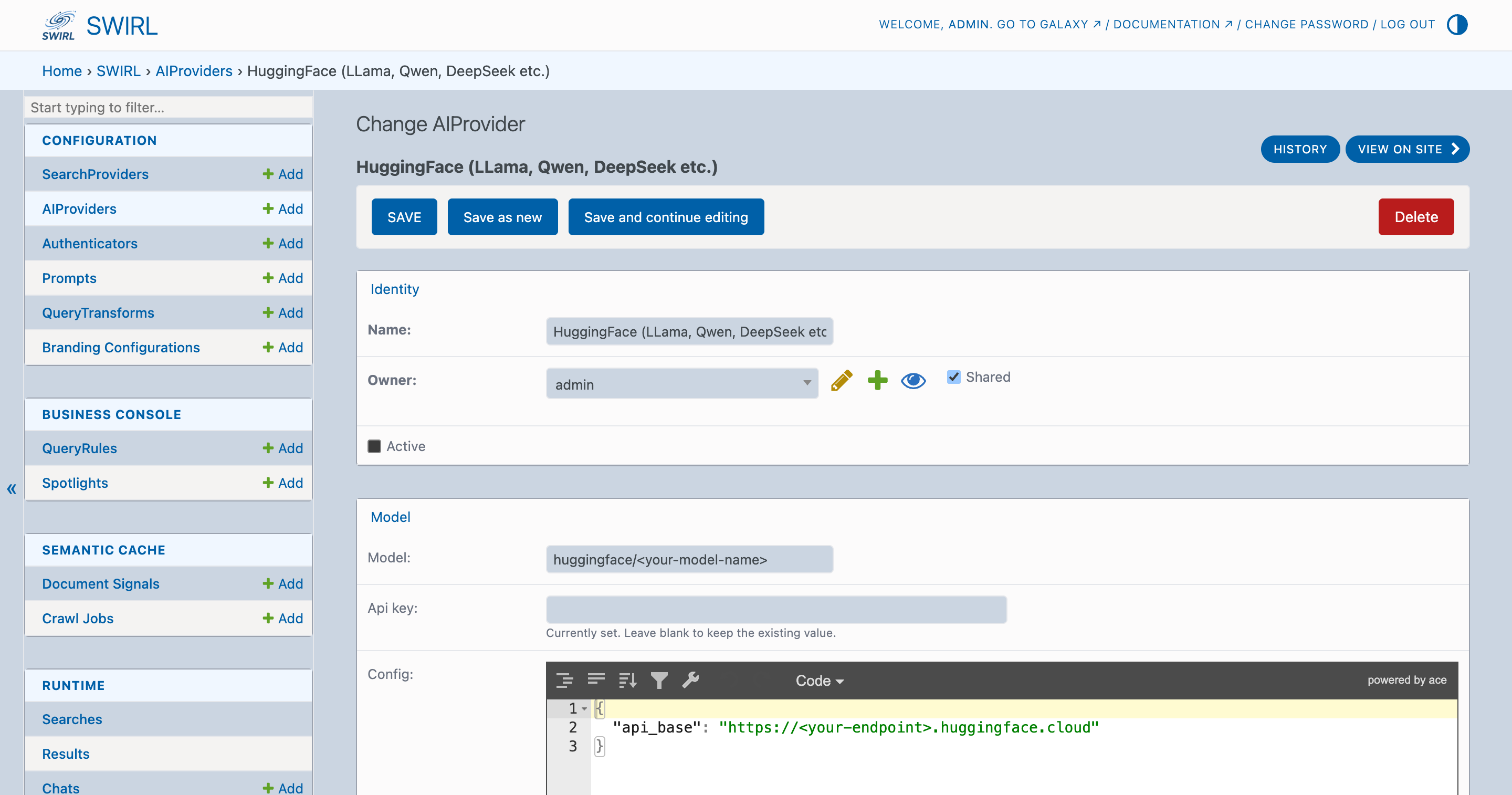
RAG calls succeed immediately - no SWIRL restart needed. To change models, route through Azure, or use a different OpenAI-compatible endpoint, edit the same record. See the RAG Guide for the full set of AIProvider options.
Configuration
Environment variables
All settings come from environment variables (prefixed SWIRL_). A .env file in the working directory is auto-loaded.
| Variable | Required | Default | Notes |
|---|---|---|---|
SWIRL_BASE_URL | yes | http://localhost:8000 | Your SWIRL instance root. |
SWIRL_USERNAME | yes | - | Basic auth user. |
SWIRL_PASSWORD | yes | - | Basic auth password. |
SWIRL_VERIFY_SSL | no | true | Set to false for self-signed certs. |
SWIRL_TIMEOUT_SECONDS | no | 30 | HTTP timeout for normal calls. |
SWIRL_RAG_TIMEOUT_SECONDS | no | 60 | Separate, larger timeout for the RAG endpoint. |
SWIRL_MAX_RESULTS | no | 50 | Upper bound on result_count (caps LLM token cost). |
SWIRL_DEFAULT_PROVIDERS | no | - | Comma-separated provider ids/names/tags applied when a caller omits providers. |
Claude Desktop
Edit ~/Library/Application Support/Claude/claude_desktop_config.json (macOS) or %APPDATA%\Claude\claude_desktop_config.json (Windows):
{
  "mcpServers": {
    "swirl": {
      "command": "swirl-mcp",
      "env": {
        "SWIRL_BASE_URL": "http://localhost:8000",
        "SWIRL_USERNAME": "<your-swirl-username>",
        "SWIRL_PASSWORD": "<your-swirl-password>"
      }
    }
  }
}
Restart Claude Desktop. You should see swirl in the tools menu.
Claude Code
claude mcp add swirl swirl-mcp \
  -e SWIRL_BASE_URL=http://localhost:8000 \
  -e SWIRL_USERNAME=<your-swirl-username> \
  -e SWIRL_PASSWORD=<your-swirl-password>
Cursor and other MCP clients
See the examples/ directory in the GitHub repo for ready-to-paste configurations.
Tools
The server exposes six tools. search is the one you'll use most often; the rest are escape hatches for async, discovery, and reuse.
| Tool | Purpose | SWIRL backend |
|---|---|---|
search | One-shot federated search. Set rag=true for a generated answer with citations. | GET /api/swirl/search/?qs=… |
create_search | Kick off a search asynchronously and get back a search_id. | POST /api/swirl/search/ |
get_results | Fetch (or re-mix) results for an existing search_id. Returns not_ready while running. | GET /api/swirl/results/?search_id=… |
rag_answer | Generate a RAG answer over an existing search's results. | GET /api/swirl/sapi/detail-search-rag/ |
list_providers | List the user's configured SearchProviders (credentials stripped). | GET /api/swirl/searchproviders/ |
list_searches | List the user's recent searches. | GET /api/swirl/search/ |
Note: rag_answer here generates an answer over an existing search's results. The SWIRL Enterprise built-in MCP server also has a rag_answer tool, but there it is an alias of search_rag and runs a full search plus RAG in one call.
search - the headline tool
One call covers the 90% case. Input:
{
  "query": "what's new in RAG?",
  "providers": ["arxiv", "europe_pmc"],
  "result_count": 10,
  "rag": true,
  "explain": false
}
Output (trimmed for brevity):
{
  "structured": {
    "search_id": 42,
    "query": "what's new in RAG?",
    "answer": "Recent work on retrieval-augmented generation…",
    "results": [
      {
        "title": "GraphRAG: …",
        "snippet": "We introduce…",
        "url": "https://arxiv.org/abs/…",
        "source": "Arxiv",
        "relevancy_score": 0.91,
        "date_published": "2025-04-01"
      }
    ]
  },
  "markdown": "## Answer\n…\n## Sources\n1. [GraphRAG: …](https://…) - _Arxiv · score 0.91_\n   > We introduce…"
}
The dual structured + markdown shape is deliberate: clients that render rich content show the markdown; clients that pass tool output back to the model verbatim get the leaner structured form.
Resources and prompts
swirl://providers(resource) - JSON catalog of active SearchProviders. Useful as pinned context in clients that support resource pinning.swirl_research(question)(prompt) - a reusable prompt template that instructs the model to callsearchwithrag=trueand cite every source.
Authentication
The server picks the right authentication method per SWIRL path:
- Basic auth for
/api/swirl/search/,/api/swirl/results/,/api/swirl/searchproviders/, etc. - DRF token for any path under
/api/swirl/sapi/(which includes the RAG endpoint). SWIRL's token middleware gates these endpoints behind a DRF Token, not Basic auth.
On the first call to a /sapi/ path, the server POSTs to /swirl/login/ with the configured username and password to obtain a token, then caches it for the lifetime of the process. You don't have to manage tokens yourself - but knowing the model helps when debugging HTTP traffic.
Credentials are never logged or returned in tool output. list_providers deliberately strips credentials, url, and query_template from its response.
Troubleshooting
| Symptom | Cause | Fix |
|---|---|---|
rag_answer returns "check the OpenAI or Azure/OpenAI credentials in your environment" | The active AIProvider in SWIRL has no API key set | Paste your key into the AIProvider record at /admin/swirl/aiprovider/ (see Enabling RAG). The MCP server itself never sees the key - SWIRL does. |
command not found: swirl-mcp after install | pipx's bin dir isn't on PATH | pipx ensurepath, then restart your shell or your MCP client. |
Connection refused / timeouts | SWIRL isn't running, or SWIRL_BASE_URL points somewhere else | curl http://localhost:8000/ should return a 302 redirect. If not, docker compose up first. |
get_results returns {"status": "not_ready"} | Search is still being mixed by SWIRL | Not an error - wait ~1s and call again. The model can loop on this. |
| TLS errors against a self-signed SWIRL cert | Default is to verify TLS | Set SWIRL_VERIFY_SSL=false in the env block. Only do this for trusted internal hosts. |
See it in action
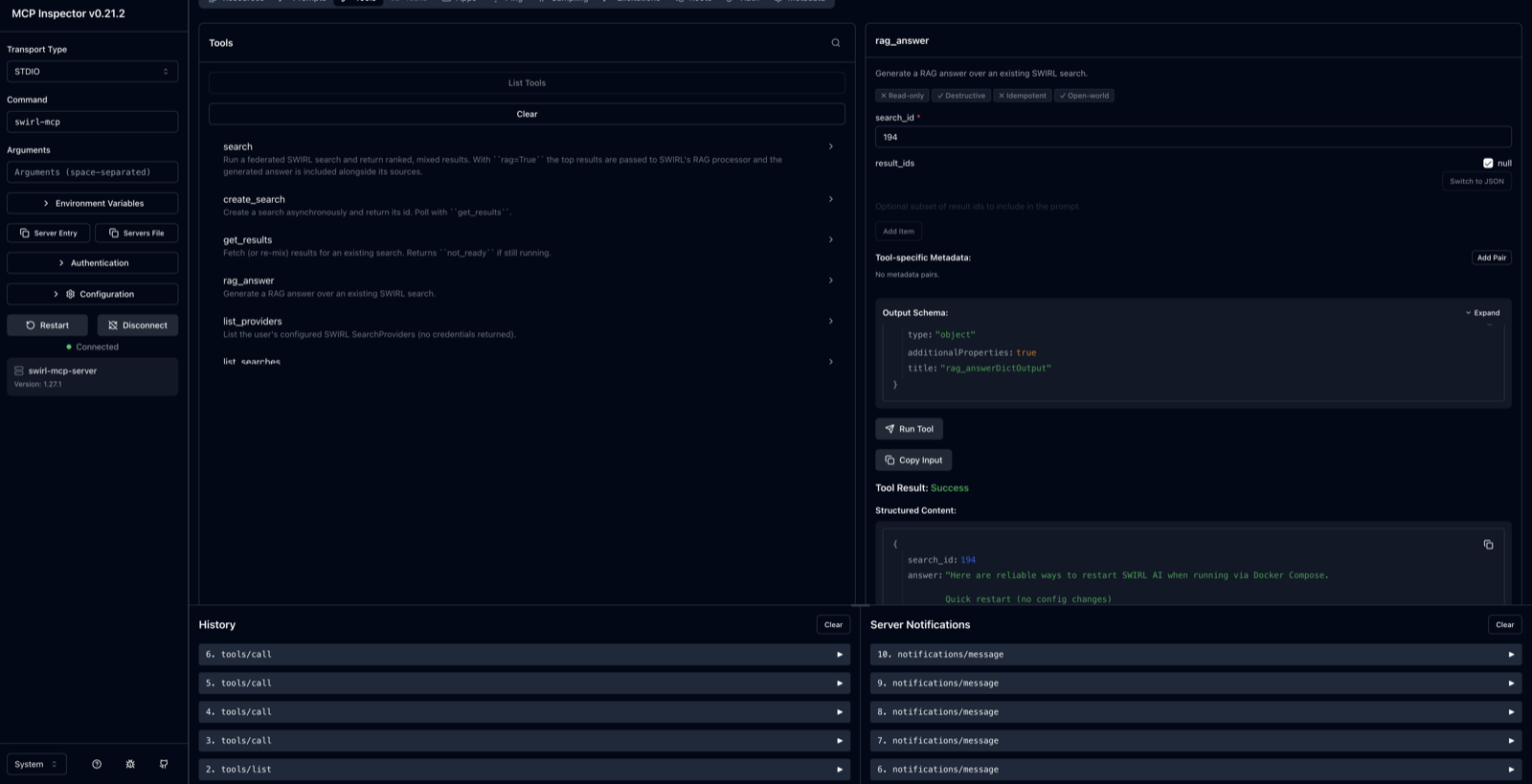
The rag_answer tool running against a local SWIRL via the MCP Inspector - a federated query answered with sources, ready to be piped into any MCP client:
See also
- GitHub repository: swirlai/swirl-mcp-server
- Model Context Protocol: modelcontextprotocol.io
- SearchProviders setup: SearchProviders Guide
- RAG configuration: RAG Guide
- Microsoft 365 connectors: M365 Guide
- SWIRL Enterprise MCP: MCP Server (Enterprise) Guide