
Semantic Cache Guide
The SWIRL Semantic Cache is a separately licensed SWIRL Enterprise capability, introduced in SWIRL 5. It keeps a searchable, permission-aware copy of documents that users have retrieved through SWIRL - so the best version of a document can be found again instantly, versions of the same document are clustered together, and one version can be designated (or automatically elected) as the canonical version for a given question.
The Semantic Cache does not change SWIRL's core promise: data stays in its original systems. The cache holds only documents that SWIRL users actually retrieved with their own credentials, and every cache hit is badged so users can verify it against the live source.
This guide covers: licensing, how documents enter the cache, searching the cache, version clustering, canonical election, pinning, freshness checks, shared-externally reconciliation, administration, and troubleshooting.
Licensing
The Semantic Cache is licensed separately from SWIRL Enterprise search and chat. Two fields in the SWIRL license govern it:
| License field | Type | Meaning |
|---|---|---|
cache |
boolean | true enables the Semantic Cache. If the field is absent, the cache is NOT licensed - there is no grandfathering for older licenses. |
cache_expiration |
date (YYYY-MM-DD), optional |
Expiration date for the cache entitlement, independent of the main license expiration. After this date the cache is treated as unlicensed even while the rest of SWIRL remains licensed. |
The license is supplied as signed JSON in the SWIRL_LICENSE environment variable (typically via .env for Docker Compose deployments):
SWIRL_LICENSE=<license-json>The license is cryptographically signed; editing any field invalidates it. To add the Semantic Cache to an existing deployment, request a new license from SWIRL that includes "cache": true.
Behavior When Unlicensed or Expired
When the cache is not licensed (or its expiration date has passed):
- Federated search continues to work normally. The seeded cache SearchProvider responds with zero results rather than an error.
- All cache ingestion is skipped - nothing new is written to the cache.
- Version clustering and canonical election are disabled.
- Manually curating a document into the cache returns
HTTP 402with an explanatory message. - RAG falls back to fetching document bodies live from the source instead of reading them from the cache.
License status is re-checked periodically at runtime, so replacing the license applies without a restart.
Checking Cache License Status
- The server startup banner reports
Semantic Cache: Licensed | Expired | Unlicensed. - The agent status endpoint reports
features.cacheas a boolean. - The Admin console license panel shows
CACHE LICENSED(with the expiration date),CACHE EXPIRED, orCACHE UNLICENSED.
How Documents Enter the Cache
The cache is populated from documents users retrieve through SWIRL - never by crawling. There are three ingestion paths:
- RAG auto-cache. When SWIRL fetches a document's full text to generate an AI Insight, the extracted text is cached automatically.
- User curation. A user can add a specific result to the cache from its result card in the Galaxy UI. If only a snippet is available, SWIRL upgrades it by fetching the full body with the user's credentials.
- Eager pre-caching (optional, off by default). When
SWIRL_EAGER_FEDERATED_PROMOTE_ENABLED=True, the top federated results of each search are cached automatically (up toSWIRL_EAGER_FEDERATED_PROMOTE_MAX, default 5, per search).
For each cached document, SWIRL stores:
- Vectors of the document's text chunks in a Qdrant collection (default
swirl_corpus), used for semantic retrieval and version clustering. - The full document body (compressed) in an object-storage tier, used for RAG without re-fetching.
- A document signal record in the SWIRL database that tracks the document's URL, state (
known → indexed → pinned), freshness timestamps, and version lineage.
Cached documents are firm-wide by default: caching and pinning operate at the deployment level, while workspaces scope sources, not documents.
To remove a document from the cache, use the un-index action on its result card, or POST /swirl/cache/unindex/.
Searching the Cache
The cache is searched through a standard SearchProvider seeded with SWIRL Enterprise: "Files - SWIRL Cache" (connector SwirlCorpusConnector). It is active and default out of the box, so every federated search includes cache results alongside live sources.
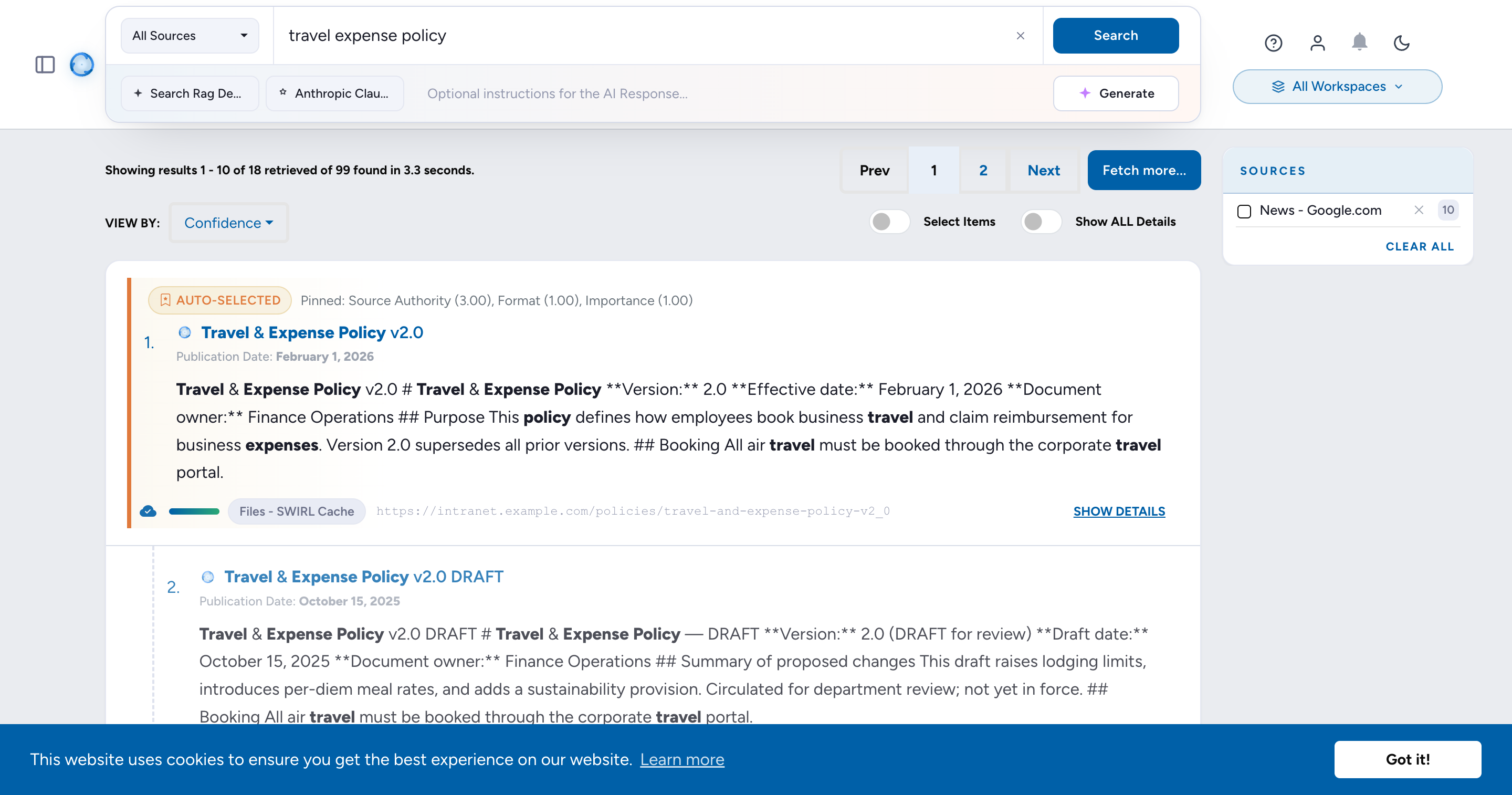
- Queries are embedded and matched against cached document chunks by vector similarity; results below the
SWIRL_CORPUS_MIN_SCOREfloor (default0.50) are not returned. - Cache results carry a
cachepayload with the document signal id, freshness information, and clustering data, which the Galaxy UI uses to render badges. - Version clustering only operates on cache results. If a search does not include the "Files - SWIRL Cache" provider, every result is treated as a singleton and no canonical version is shown.
An optional hybrid mode (SWIRL_CORPUS_HYBRID=True) combines dense vectors with sparse BM25 scoring. Enabling it on an existing deployment requires the one-time upgrade_corpus_to_hybrid migration - see Management Commands.
Version Clustering
Organizations accumulate many copies of the same document - drafts, finals, exports, copies in email and chat. The Semantic Cache groups these into version clusters at search time:
- Each cached result is compared to its nearest neighbors in the vector store; documents whose similarity exceeds
SWIRL_VERSION_SIMILARITY_THRESHOLD(default0.95) are linked into one cluster. - In the Galaxy UI, a cluster is collapsed to its best version, with the other versions available from the result card.
- Results from live (non-cache) sources are never clustered - they appear as singletons.
The default threshold of 0.95 is deliberately strict: it clusters true versions of the same document while keeping distinct documents on the same topic apart. Lowering it increases the risk of unrelated documents merging into one cluster.
Canonical Election
Within a version cluster, SWIRL can elect one version as canonical - the version users should rely on. Election runs automatically when SWIRL_CANONICAL_AUTO_ELECT_ENABLED=True (the default) and combines:
- Source authority - for example, a document-management system outranks a file share copy (weights are configurable per deployment).
- Naming convention - "final" beats "draft-v2-copy".
- Recency - newer versions score higher.
- Format authority - for example, PDF outranks an editable copy for finished documents.
- User signals - a user pin adds a large bonus; a prior rejection applies a penalty.
Two guards keep elections honest:
- Relevance gate: a cluster is only eligible for canonical treatment when its best member scores at least
SWIRL_CANONICAL_QUERY_RELEVANCE_MIN(default0.10) and at leastSWIRL_CANONICAL_QUERY_RELEVANCE_RATIO(default0.6) of the strongest cluster for the query. Irrelevant clusters never display a canonical badge. - Explicit scopes win: elections recorded for an explicit matter or topic scope take precedence over firm-wide (unscoped) elections.
The elected version is badged Auto-selected in the Galaxy UI and, when SWIRL_CANONICAL_MIXER_PROMOTION=True (default), is promoted in result ordering. Election runs are recorded and reviewable via the canonical review API (GET /swirl/canonical/).
Pinning
Pinning lets a user (typically a curator or knowledge manager) declare the correct version of a document for a specific query. A pinned document is badged Pinned and outranks automatic election for that query.
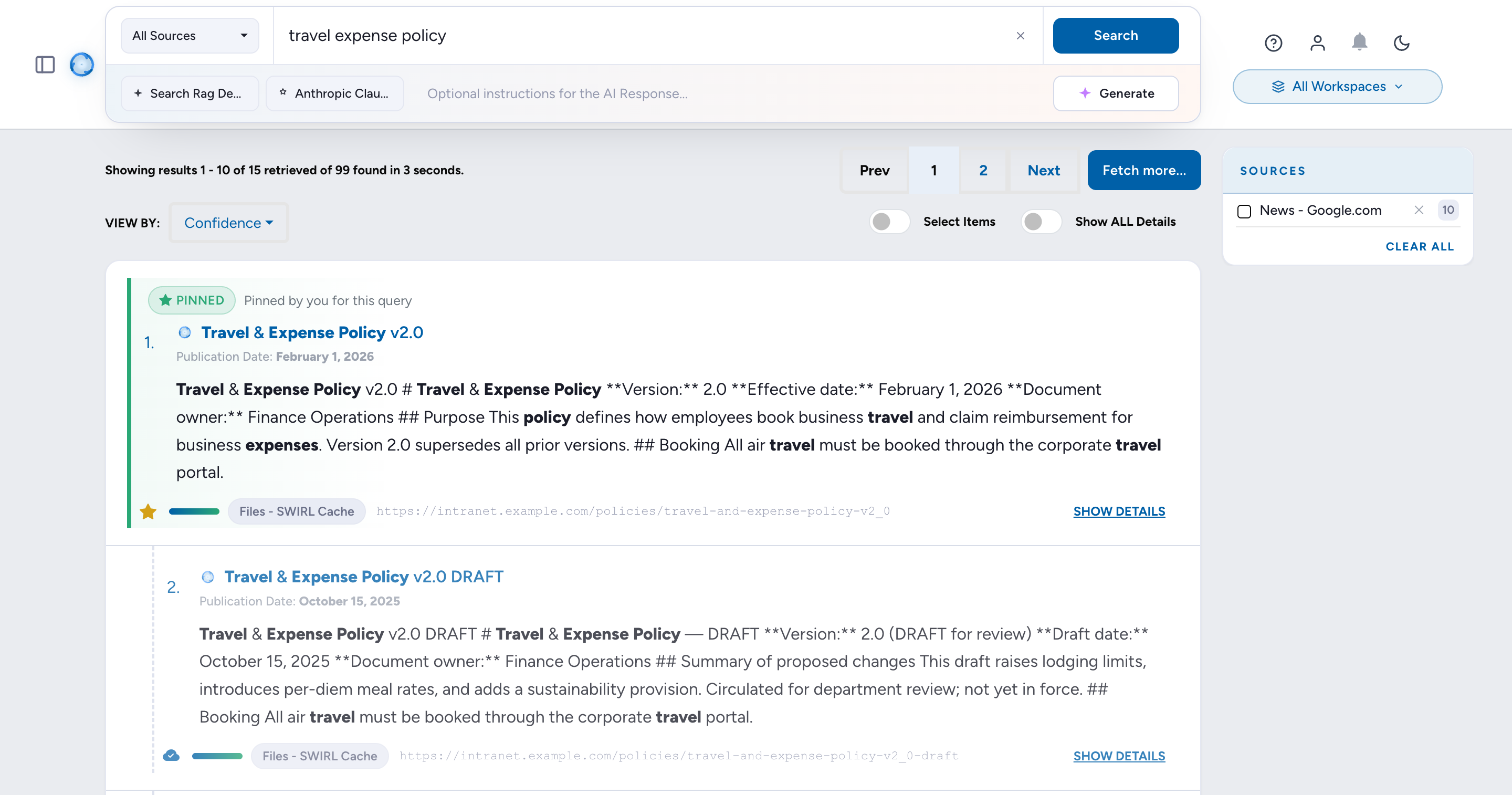
Pinning a Document
Pin from the result card in the Galaxy UI, or via the API:
POST /swirl/canonical/pin-for-query/
{
  "signal_id": 123,
  "query": "data retention policy"
}- Pins are per query: different documents can be pinned for different queries (multi-pin).
- Pins are firm-wide ("All Workspaces"): a pin applies to everyone, regardless of the workspace it was created from.
- If you previously pinned a different document for the same query, the API returns
HTTP 409with the existing pin; re-send with"force": trueto replace it.
Approving or Rejecting an Automatic Election
Reviewers can confirm or overturn automatic elections from the canonical review queue:
POST /swirl/canonical/<run-id>/approve/- approves the elected winner, which pins it for the run's query; other cluster members are marked as superseded alternates.POST /swirl/canonical/<run-id>/reject/- rejects the election, recording a reason (wrong version, wrong document, not authoritative, duplicate, and so on) that penalizes the rejected version in future elections.
Unpinning
Unpinning (POST /swirl/canonical/<signal-id>/unpin/, or from the result card) is neutral: it removes the pin without penalizing the document. The cluster simply re-elects on merits at the next search - possibly choosing the same document again, now badged Auto-selected rather than Pinned.
Freshness and Liveness
Because cached copies can outlive their sources, every cache result carries freshness metadata:
- Verify on use. Each cache result reports when it was last verified against its source. Results that have not been verified recently (or whose verification age exceeds the staleness window) are badged so users know to verify before relying on them. This check uses stored metadata only - no network calls at query time.
- No longer available from source. When a cache result has no corroborating live result in the same search, the Galaxy UI can trigger an on-demand liveness probe (
POST /swirl/cache/check_liveness/). The probe uses the caching user's stored credentials and returns a verdict ofalive,gone, orunknown. Only a definitive404/410marks a document as no longer available - transient errors never do.
Liveness checks are read-only: SWIRL never deletes a cached document automatically. Removing a document from the cache is always an explicit user or admin action (POST /swirl/cache/unindex/).
Shared Externally
SWIRL can reconcile cached documents against the user's own Outlook Sent Items to discover which document versions have been shared outside the organization. A cached version that was sent to an external recipient is badged Shared externally in the Galaxy UI; clicking the badge opens the exact Sent message in Outlook on the web.
- Scanning. A scan (
POST /swirl/egress/scan/) reads the user's own mailbox with the user's own M365 token. Poll progress withGET /swirl/egress/scan/<scan-id>/. Scans can be scoped by matter tag and date window, and are capped bySWIRL_EGRESS_MAX_MESSAGES. - Events. Each match becomes an egress event (
GET /swirl/egress/events/) recording the document signal, external domains, channel, sent time, and match method. A reviewer confirms or dismisses a candidate match withPATCH /swirl/egress/events/<event-id>/. - Election boost. A version that was shared externally receives a small flat bonus in canonical election (the
egress_externalweight, default1.5), on the reasoning that the version sent outside the firm is usually the finished one. The curator decides - the badge informs, it does not pin. - Privacy. Only the external domain of each recipient is stored - never individual external recipient addresses.
Multi-domain organizations must list every verified internal domain in SWIRL_ORG_INTERNAL_DOMAINS; otherwise a send to a sister domain can be classified as external. The scanning user's own email domain is always treated as internal.
Administration
Services
The Semantic Cache uses two additional services, both included in the SWIRL Enterprise Docker Compose stack:
| Service | Purpose | Key settings |
|---|---|---|
| Qdrant | Vector store for cached document chunks (collection swirl_corpus) |
SWIRL_QDRANT_MODE (docker | external | memory | disabled), SWIRL_QDRANT_URL (default http://localhost:6333) |
| Object storage (SeaweedFS, S3-compatible) | Compressed full-text bodies of cached documents | SWIRL_STORAGE_BACKEND=s3, SWIRL_STORAGE_ENDPOINT, SWIRL_STORAGE_BUCKET (default swirl-cache-bodies), SWIRL_STORAGE_EXPIRATION_DAYS (default 90) |
Key Settings
All settings live in the environment (.env for Docker Compose). Defaults are production defaults; most deployments only ever change the ones in the first table.
| Setting | Default | Purpose |
|---|---|---|
SWIRL_VERSION_SIMILARITY_THRESHOLD |
0.95 |
Minimum similarity for two cached documents to join one version cluster |
SWIRL_CANONICAL_AUTO_ELECT_ENABLED |
True (set in the shipped .env.dist; the built-in code default is False) |
Automatically elect a canonical version per cluster; when False, only user pins mark a canonical version |
SWIRL_CORPUS_MIN_SCORE |
0.50 |
Minimum similarity for a cached document to appear in search results |
SWIRL_CANONICAL_QUERY_RELEVANCE_MIN |
0.10 |
Relevance gate: absolute floor for canonical eligibility |
SWIRL_CANONICAL_QUERY_RELEVANCE_RATIO |
0.6 |
Relevance gate: required fraction of the strongest cluster's score |
SWIRL_CANONICAL_MIXER_PROMOTION |
True |
Promote the canonical winner in mixed result ordering |
SWIRL_EAGER_FEDERATED_PROMOTE_ENABLED |
False |
Cache top federated results of every search automatically |
SWIRL_EAGER_FEDERATED_PROMOTE_MAX |
5 |
Maximum results cached per search when eager pre-caching is enabled |
SWIRL_CORPUS_HYBRID |
False |
Hybrid dense + sparse retrieval (requires upgrade_corpus_to_hybrid) |
SWIRL_CACHE_LIVENESS_PROBE_TIMEOUT |
10.0 |
Timeout (seconds) for on-demand liveness probes |
SWIRL_CACHE_LIVENESS_RECHECK_SECONDS |
3600 |
Minimum interval before re-probing the same document |
SWIRL_CACHE_LIVENESS_SYNC |
False |
Opt-in synchronous verification of cache hits on the query path: suppress known-dead hits and probe un-verified hits before returning results. Off by default - the default query path performs no liveness network I/O |
SWIRL_CACHE_LIVENESS_SYNC_MAX |
10 |
Maximum un-verified hits probed per result page when synchronous verification is on |
SWIRL_CACHE_LIVENESS_SYNC_TIMEOUT |
2.0 |
Timeout (seconds) per synchronous probe |
SWIRL_ORG_INTERNAL_DOMAINS |
empty | Verified internal email domains for Shared Externally classification; required for multi-domain organizations |
SWIRL_EGRESS_MAX_MESSAGES |
1000 |
Per-scan cap on Sent-Items messages enumerated by an egress scan |
SWIRL_STORAGE_MAX_BODY_MB |
50 |
Largest document body stored in the cache |
SWIRL_CACHE_DEBUG |
True |
Emit cache_trace diagnostic log lines |
Canonical election weights (source authority, naming convention, recency, format, pin bonus, rejection penalty, shared-externally bonus) are configurable via SWIRL_CANONICAL_WEIGHTS; contact SWIRL support before tuning them.
Management Commands
Run these inside the SWIRL container (Docker) or from the install directory:
docker compose exec swirl python manage.py <command>| Command | Purpose |
|---|---|
upgrade_corpus_to_hybrid |
One-time migration of the cache collection to the hybrid (dense + sparse) schema. Required before setting SWIRL_CORPUS_HYBRID=True; without it, cache queries fail with a missing “sparse” vector error. |
reset_semantic_cache |
Clean-slate reset: empties the vector collection and deletes all cache bookkeeping rows. Supports --matter-tag to scope the reset. |
dedup_signal_url_hash |
Merge duplicate cache records created by historical URL-encoding differences. Dry-run by default; pass --apply to mutate. |
drop_entity_collection |
Remove a legacy swirl_entities vector collection, if present. Dry-run by default; pass --yes to delete. |
canonical_diag |
Diagnostics for version clustering and canonical election. |
cleanup_stale_canonical_runs |
Prune old canonical election runs. |
API Summary
| Endpoint | Method | Purpose |
|---|---|---|
/swirl/ingest/ |
POST | Curate a document into the cache (402 if the cache is unlicensed) |
/swirl/cache/unindex/ |
POST | Remove a document from the cache |
/swirl/cache/check_liveness/ |
POST | On-demand probe: is the cached document still available at its source? |
/swirl/canonical/ |
GET | List canonical election runs (review queue) |
/swirl/canonical/<run-id>/ |
GET | Inspect one election run, including per-member scoring |
/swirl/canonical/pin-for-query/ |
POST | Pin a document as canonical for a query |
/swirl/canonical/<run-id>/approve/ |
POST | Approve an automatic election (pins the winner) |
/swirl/canonical/<run-id>/reject/ |
POST | Reject an election with a reason |
/swirl/canonical/<signal-id>/unpin/ |
POST | Remove a pin (neutral; cluster re-elects on merits) |
/swirl/egress/scan/ |
POST | Start a Sent-Items egress scan (see Shared Externally) |
/swirl/egress/scan/<scan-id>/ |
GET | Poll scan status and counts |
/swirl/egress/events/ |
GET | List the user's egress events |
/swirl/egress/events/<event-id>/ |
PATCH | Confirm or dismiss a candidate egress match |
Troubleshooting
| Symptom | Likely cause and fix |
|---|---|
| Cache provider returns no results and nothing is ever cached | Cache not licensed: the license lacks "cache": true or cache_expiration has passed. Check the startup banner or the Admin console license panel; request an updated license. |
| Curating a document returns HTTP 402 | Same as above - the Semantic Cache is not licensed. |
| Every version appears as its own result; no clustering | The search did not include the “Files - SWIRL Cache” provider, or the documents are not yet cached. Clustering only operates on cache results. |
| Cache queries fail mentioning a missing “sparse” vector | SWIRL_CORPUS_HYBRID=True was set without running upgrade_corpus_to_hybrid. Run the command once, or set the flag back to False. |
| Unrelated documents cluster together | SWIRL_VERSION_SIMILARITY_THRESHOLD was lowered. Restore the default 0.95. |
| No canonical badge on a relevant cluster | The relevance gate filtered it (cluster scored below the floor or ratio), or SWIRL_CANONICAL_AUTO_ELECT_ENABLED=False. Inspect the run via GET /swirl/canonical/. |
| The same document is shown twice as separate cache entries | Historical URL-encoding duplicates. Run dedup_signal_url_hash --apply. |
Related Guides
- User Guide (Enterprise) - searching, result cards, AI Insights.
- Admin Guide - deployment-wide configuration and operations.
- AI Search Guide - AI Providers and RAG configuration.
- MCP Server (Enterprise) - the MCP server uses the cache opportunistically when licensed.