
Docker Build for SWIRL Community
The Docker version of SWIRL does not retain any data or configuration when shut down!
Please contact support for a Docker image suitable for production deployment.
Install Docker
https://docs.docker.com/engine/install/
Clone the Repo Branch
git clone https://github.com/swirlai/swirl-search
Feel free to specify the name of a new directory, instead of using the default (swirl-search):
git clone https://github.com/swirlai/swirl-search my-directory
Setup Container
cd swirl-search
docker build . -t swirlai/swirl-search:latest
If you cloned to a directory other than swirl-search, replace it above.
This command should produce a long response starting with:
[+] Building 132.2s (21/21) FINISHED
...etc...
If you see any error messages, please contact support for assistance.
Start Container
docker compose up
Docker should respond with the following, or similar:
[+] Running 2/2
Network swirl-search_default Created 0.0s
Container swirl-search-app-1 Created 0.0s
Attaching to swirl-search-app-1
Note down the container ID attached, as it will be needed later!
The Container ID in this example is swirl-search-app-1. It will be different if you cloned the repo to a different folder.
Moments later, Docker desktop will reflect the running Container:

Super User Account
The stack starts with a preloaded super user account - username admin, password password. Change the password immediately for any deployment that is reachable by others.
To create an additional super user:
docker exec -it swirl-search-app-1 python manage.py createsuperuser --email admin@example.com --username <new-username>
Again, replace swirl-search-app-1 with your Container ID if different.
Enter a new password, twice. If Django complains that the password is too simple, type "Y" to use it anyway.
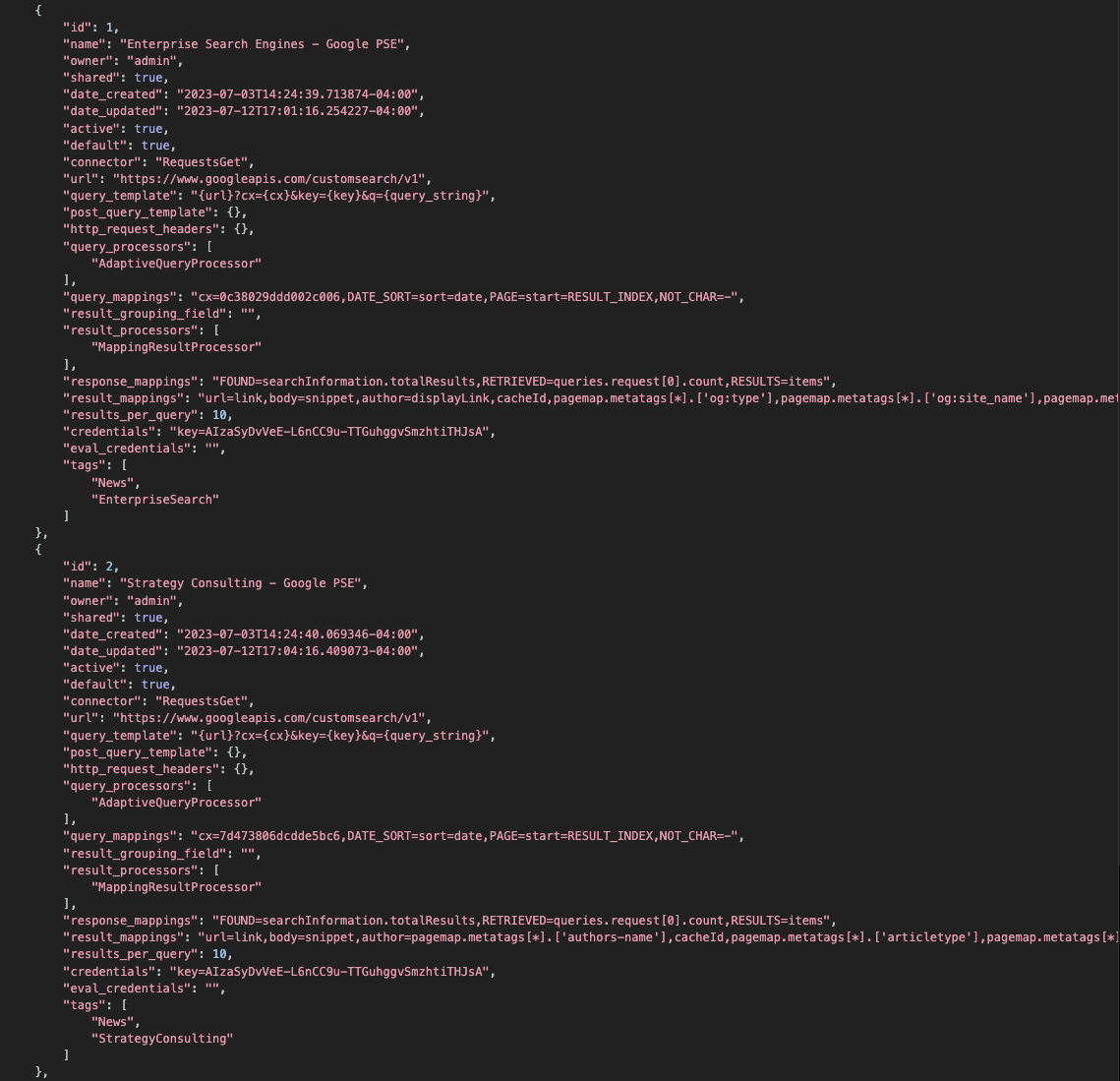
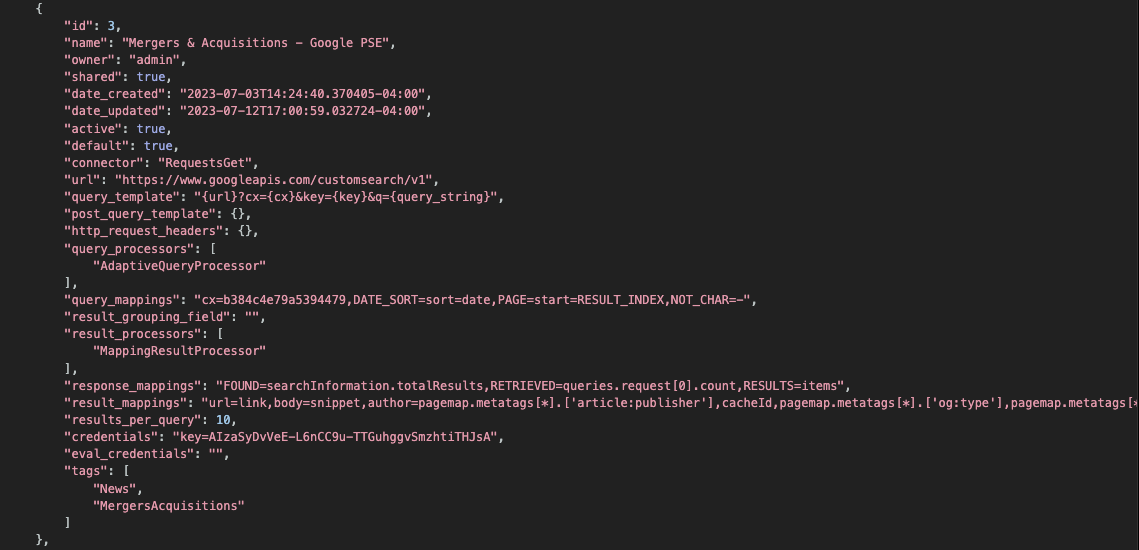
Load Google PSE SearchProviders
The Google PSE SearchProviders need your own Google credentials before they will return results. SWIRL does not embed a Google API key - Google's Custom Search API is billed against whichever account owns the key, so every install must supply its own. After loading the records, edit each one and paste your Google API key into the credentials field plus your PSE engine ID (cx) into the query template field. See the SearchProvider Guide for the full walkthrough.
docker exec -it swirl-search-app-1 python swirl_load.py SearchProviders/google_pse.json -u admin -p super-user-password
Replace super-user-password with the super user password. Also, replace swirl-search-app-1 with your container ID if different.
The script will load all SearchProvider configurations in the specified file at once and confirm.
View SearchProviders
http://localhost:8000/swirl/searchproviders/
This should bring up the following, or similar:
Run a Query!
http://localhost:8000/swirl/search/?q=cybersecurity+policy
After 5-7 seconds, this should bring up a unified, relevancy ranked result list:
The raw JSON response (trimmed for documentation):
{
  "messages": [
    "SWIRL AI COMMUNITY 5.0.0.0",
    "[2026-05-20 11:38:04.559113] Retrieved 10 of 100 results from: News - Google News",
    "[2026-05-20 11:38:04.974641] Retrieved 10 of 5187 results from: Articles - EuropePMC",
    "[2026-05-20 11:38:05.507881] Retrieved 10 of 1449 results from: Web - Internet Archive",
    "[2026-05-20 11:38:05.983136] Results ordered by: RelevancyMixer"
  ],
  "info": {
    "results": {
      "found_total": 6727,
      "retrieved_total": 30,
      "retrieved": 10,
      "federation_time": 10.8,
      "result_blocks": [
        "ai_summary"
      ],
      "next_page": "http://localhost:8000/swirl/results/?search_id=9&page=2"
    },
    "Web - Internet Archive": {
      "found": 1449,
      "retrieved": 10,
      "filter_url": "http://localhost:8000/swirl/results/?search_id=9&provider=4",
      "query_string_to_provider": "cybersecurity policy",
      "search_time": 3.6
    },
    "Articles - EuropePMC": {
      "found": 5187,
      "retrieved": 10,
      "filter_url": "http://localhost:8000/swirl/results/?search_id=9&provider=5",
      "query_string_to_provider": "cybersecurity policy",
      "search_time": 3.2
    },
    "News - Google News": {
      "found": 100,
      "retrieved": 10,
      "filter_url": "http://localhost:8000/swirl/results/?search_id=9&provider=2",
      "query_string_to_provider": "cybersecurity policy",
      "search_time": 2.0
    }
  },
  "results": [
    {
      "swirl_rank": 1,
      "swirl_score": 24911.43237469431,
      "searchprovider": "News - Google News",
      "searchprovider_rank": 5,
      "title": "Maryland unveils statewide zero-trust <em>cybersecurity</em> <em>policy</em> - StateScoop",
      "url": "https://news.google.com/rss/articles/CBMijgFBVV95cUxOR2VDaEJaU1ZVNzg4Xzc3SGZkTkV3MEFrblFZTExJcXh1OWN...",
      "body": "Maryland unveils statewide zero-trust <em>cybersecurity</em> <em>policy</em> StateScoop...",
      "date_published": "2026-02-24 08:00:00+00:00",
      "author": "StateScoop",
      "swirl_id": 5
    },
    {
      "swirl_rank": 9,
      "swirl_score": 5750.152160674617,
      "searchprovider": "Articles - EuropePMC",
      "searchprovider_rank": 1,
      "title": "<em>Cybersecurity</em> <em>policy</em> framework requirements for the establishment of highly interoperable and intercon",
      "url": "https://europepmc.org/article/MED/38784226",
      "body": "This paper examines <em>cybersecurity</em> <em>policy</em> framework requirements for establishing highly interoperable and interconnected health data spaces, w...",
      "date_published": "2024-01-01 00:00:00",
      "author": "Luidold C, Jungbauer C.",
      "swirl_id": 11
    }
  ],
  "ai_summary": []
}
Congratulations, SWIRL Docker is installed!
Notes
SWIRL in Docker cannot use localhost to connect to local endpoints!
For example: If you have solr running on localhost:8983, SWIRL will be unable to contact it from inside the Docker container using that URL.
To configure such a source, get the hostname. On macOS:
% hostname
AgentCooper.local
In the SearchProvider configuration, replace localhost with the hostname:
"url": "http://AgentCooper.local:8983/solr/{collection}/select?wt=json",
Inspecting the published image (SBOM & vulnerabilities)
Every swirlai/swirl-search:latest build (since 4.5.0.1) is published with a Software Bill of Materials (SBOM) and a max-detail provenance attestation. You can fetch either without running the container.
Docker Scout (recommended)
The friendliest view - Docker Scout reads the SBOM attestation and renders it as a tabular summary, then cross-references it against its vulnerability database.
docker scout sbom swirlai/swirl-search:latest
docker scout cves swirlai/swirl-search:latest
Both commands require the Docker Scout CLI (bundled with Docker Desktop, or installable separately via these instructions).
Raw SBOM via docker buildx
For machine-readable SPDX JSON (useful for compliance pipelines or feeding into your own SBOM tooling):
docker buildx imagetools inspect swirlai/swirl-search:latest \
  --format '{{ json .SBOM }}' | jq .
To extract just the package list:
docker buildx imagetools inspect swirlai/swirl-search:latest \
  --format '{{ json .SBOM }}' \
  | jq -r '.. | objects | select(.name and .version) | "\(.name)==\(.version)"' \
  | sort -u
The image is multi-arch (linux/amd64 + linux/arm64). To get a per-architecture SBOM:
docker buildx imagetools inspect swirlai/swirl-search:latest \
  --format '{{ json (index .SBOM "linux/amd64") }}' | jq .
Provenance attestation
To inspect the build metadata (source commit, base image, build environment):
docker buildx imagetools inspect swirlai/swirl-search:latest \
  --format '{{ json .Provenance }}' | jq .