
Developer Reference
State Table
The following table provides a detailed breakdown of each step in the federation process, along with the corresponding status and other key state information.
| Action | Module | Status | Notes |
|---|---|---|---|
| Search object created | views.py SearchViewSet.create() | Search.status: NEW_SEARCH UPDATE_SEARCH |
Required:Search.query_string |
| Pre-processing | search.py search() | Search.status: PRE_PROCESSING |
Checks permissions Loads the Search object |
| Pre-query processing | search.py search() | Search.status: PRE_QUERY_PROCESSING |
Processes Search.query_string and updates Search.query_string_processed |
| Federation | search.py search() | Search.status: FEDERATING PARTIAL_RESULTS FULL_RESULTS |
Creates one Connector for each SearchProvider in the Search |
| Connector Init | connectors/connector.py connectors/db_connector.py |
Connector.status: INIT READY |
Loads the Search and SearchProvider |
| Connector Federate | federate() | Connector.status: FEDERATING |
|
| Connector Query Processing | process_query() | Connector.status: FEDERATING |
Processes Search.query_string_processed and stores it in Connector.query_string_to_provider |
| Connector Construct Query | construct_query() | Connector.status: FEDERATING |
Takes Connector.query_string_to_provider and creates Connector.query_to_provider |
| Connector Validate Query | validate_query() | Connector.status: FEDERATING |
Returns "False" if Connector.query_to_provider is empty |
| Connector Execute Search | execute_search() | Connector.status: FEDERATING |
Connects to the SearchProvider Executes the search using Connector.query_to_providerStores the response in Connector.response |
| Connector Normalize Response | normalize_response() | Connector.status: FEDERATING |
Transforms Connector.response into a JSON list of dictionariesStores it in Connector.results |
| Connector Process Results | process_results() | Connector.status: FEDERATING READY |
Processes Connector.results |
| Connector Save Results | save_results() | Connector.status: READY |
Returns "True" |
| Post-result processing | search.py search() | Search.status: POST_RESULT_PROCESSING FULL_RESULTS_READY FULL_UPDATE_READY |
Runs the post_result_processorsUpdates Result objects |
Search.Status
Normal States
| Status | Meaning |
|---|---|
| NEW_SEARCH | The search object is to be executed immediately. |
| UPDATE_SEARCH | The search object is to be updated immediately. |
| PRE_PROCESSING | SWIRL is performing pre-processing for this search. |
| PRE_QUERY_PROCESSING | SWIRL is performing pre-query processing for this search. |
| FEDERATING | SWIRL is provisioning Celery workers with Connectors and waiting for results. |
| FULL_RESULTS | SWIRL has received all results. |
| NO_RESULTS_READY | SWIRL received no results from any provider. |
| PARTIAL_RESULTS | SWIRL has received results from some providers, but not all. |
| POST_RESULT_PROCESSING | SWIRL is performing post-result processing. |
| PARTIAL_RESULTS_READY | SWIRL has processed results from responding providers. |
| PARTIAL_UPDATE_READY | SWIRL has processed updated results from responding providers. |
| FULL_RESULTS_READY | SWIRL has processed results for all specified providers. |
| FULL_UPDATE_READY | SWIRL has processed updated results for all specified providers. |
| CANCELLING | A cancel request was received; the search is shutting down cleanly. |
| CANCELLED | The search was cancelled before completion. |
Error States
| Status | Meaning |
|---|---|
| ERR_DUPLICATE_RESULT_OBJECTS | More than one Result object was found; contact support for assistance. |
| ERR_NEED_PERMISSION | The Django user does not have sufficient permissions to perform the requested operation. More: Permissioning Normal Users. |
| ERR_NO_ACTIVE_SEARCHPROVIDERS | Search failed because no specified SearchProviders were active. |
| ERR_NO_QUERY_STRING | The Search has no query_string. |
| ERR_NO_SEARCHPROVIDERS | Search failed because no SearchProviders were specified. |
| ERR_PRE_QUERY_PROCESSING | An error occurred during pre-query processing - check logs/celery-search-worker.log for details. |
| ERR_POST_RESULT_PROCESSING | An error occurred during post-result processing - check logs/celery-search-worker.log for details. |
| ERR_ORCHESTRATOR_EXCEPTION | The search orchestrator raised an unhandled exception during federation. |
| ERR_ORCHESTRATOR_DIED | The search orchestrator process terminated unexpectedly during federation. |
| ERR_RESULT_NOT_FOUND | A Result object that was expected to be found was not; contact support for assistance. |
| ERR_SUBSCRIBE_PERMISSIONS | The user who created the Search object lacks permission to enable subscribe mode. |
Key Module List
Interactive API Documentation
SWIRL provides interactive API documentation via Swagger UI, powered by drf-spectacular:
http://localhost:8000/swirl/api/docs/
This interface allows you to explore all available API endpoints, view request/response schemas, and test API calls directly from your browser.
SWIRL's API is mounted under two prefixes - /swirl/... and /api/swirl/... - that serve the same endpoints; either prefix works.
Additional APIs
Beyond the SearchProvider, Search, and Result APIs documented below, SWIRL 5 exposes these developer-facing endpoints. Full request/response schemas for each are in the Swagger / OpenAPI docs:
| URL | Explanation |
|---|---|
| /swirl/aiproviders/ | List, create, and edit AIProvider objects (models, keys, roles) |
| /swirl/authenticators/ | List, create, and edit Authenticator objects |
| /swirl/prompts/ | List, create, and edit Prompt objects used by RAG and the Assistant |
| /swirl/pipelines/ | List, create, and edit Pipeline objects (pre-query and post-result stage lists) |
| /swirl/workspaces/ | List and manage Workspaces, members, and invites |
| /swirl/search/<id>/rerank/ | Re-rank an existing search's results |
| /swirl/search/<id>/fetch_more/ | Fetch additional results for an existing search |
| /swirl/rag-search/ | Generate an AI summary over an existing search (see the Developer Guide) |
SearchProvider Object
A SearchProvider defines a searchable source. It includes metadata identifying the connector type used to search the source, along with various configuration properties. Many properties are optional when creating a SearchProvider object, and default values are listed below.
Properties
| Property | Description | Default Value (Example Value) |
|---|---|---|
| id | Unique identifier for the SearchProvider | Automatic (1) |
| name | Human-readable name for the source | "" ("Enterprise Search PSE") |
| description | Description of the source, shown to users and used by the AI Search Assistant to decide when to search it (up to 2KB) | "SearchProvider description" ("Searches the user's OneDrive files...") |
| owner | Username of the Django user who owns the object | Logged-in user ("admin") |
| workspace | Optional Workspace that scopes this source; null means the provider is deployment-wide |
null ("legal") |
| groups | List of Django group names permitted to use this provider | [] (["legal-team"]) |
| shared | Boolean: if true, the SearchProvider can be searched by other users; if false, it is available only to the owner |
true (false) |
| date_created | Timestamp when the SearchProvider was created | Automatic (2022-02-28T17:55:04.811262Z) |
| date_updated | Timestamp when the SearchProvider was last updated | Automatic (2022-02-29T18:03:02.716456Z) |
| active | Boolean: if true, the SearchProvider is used; if false, it is ignored in federated searches |
true (false) |
| default | Boolean: if true, the SearchProvider is queried when no searchprovider_list is specified; if false, it must be explicitly included in searchprovider_list |
true (false) |
| authenticator | Name (idp) of the Authenticator whose per-user token this source uses, e.g. Microsoft; null for sources that use credentials instead |
null ("Microsoft") |
| connector | Name of the Connector to use for this source | "RequestsGet" ("RequestsGet") |
| url | URL or file path required by the Connector for this source (not validated) | "" ("https://www.googleapis.com/customsearch/v1") |
| query_template | String with optional {variable} placeholders for dynamic query construction. The Connector binds this template with url, query_string, query_mappings, and credentials at runtime. |
"{url}?q={query_string}" ("{url}?q={query_string}") |
| query_template_json | JSON form of query_template, for connectors that take a JSON query body |
{} ({}) |
| query_language | Query language of the source, used when rewriting the query for it | "Generic_Keyword" ("Generic_Keyword") |
| post_query_template | For the RequestsPost Connector: valid JSON with a query marker used in the POST body | {} ("query": "{query_string}","limit": "100") |
| http_request_headers | Custom HTTP request headers for the source | "" ("Accept": "application/vnd.github.text-match+json") |
| query_processors | List of processors applied to the query before execution | ["AdaptiveQueryProcessor"] (["AdaptiveQueryProcessor"]) |
| query_mappings | String defining query parameter mappings, dependent on the Connector | "" ("cx=your-google-search-engine-key") |
| result_grouping_field | Used with DedupeByFieldResultProcessor to define a field for duplicate suppression |
"" ("resource.conversationId") |
| result_processors | List of processors normalizing results from this source | ["MappingResultProcessor", "DateFinderResultProcessor", "CosineRelevancyResultProcessor"] (["MappingResultProcessor","CosineRelevancyResultProcessor"]) |
| response_mappings | JSONPath mappings to transform the source's response into a standardized JSON result set | "" ("FOUND=searchInformation.totalResults, RETRIEVED=queries.request[0].count, RESULTS=items") |
| result_mappings | Key-value mappings for result fields. See SP Guide, Result Mappings for details. | "" ("url=link,body=snippet,cacheId,NO_PAYLOAD") |
| results_per_query | Number of results requested per query from this source | 10 (20) |
| credentials | Credentials used for authentication (dependent on source) | "" ("key=your-google-json-api-key") |
| eval_credentials | Session-based credential variables for dynamic authentication | "" ("session['my-connector-token']") |
| tags | List of strings for categorizing SearchProviders | [] (["News", "EnterpriseSearch"]) |
| page_fetch_config_json | Page Fetcher configuration for retrieving full document content from this source; see the AI Search Guide | {} ({"cache": "false", "timeout": 10}) |
| ephemeral_store_config_json | Ephemeral result storage configuration; when ephemeral is true, results from this source are not persisted |
{"ephemeral": false} ({"ephemeral": false}) |
| config | Free-form JSON configuration; holds source-specific settings such as detailed instructions for the AI Search Assistant or the recent_files capability block |
{} ({}) |
The CosineRelevancyResultProcessor must follow MappingResultProcessor in the result_processors list.
APIs
| URL | Explanation |
|---|---|
| /swirl/searchproviders/ | List all SearchProvider objects (newest first); create a new one using the POST form |
| /swirl/searchproviders/id/ | Retrieve a specific SearchProvider object; delete it using the DELETE button; edit it using the PUT button |
Search Object
A Search object is a JSON dictionary that defines a search operation. Each search has a unique ID and may be referenced by Result objects.
The only required property is query_string, which contains the search text. All other properties are optional and have default values. SWIRL executes searches asynchronously, updating properties like status and result_url in real-time.
Properties
| Property | Description | Default Value (Example Value) |
|---|---|---|
| id | Unique identifier for the Search | Automatic (search_id=1) |
| owner | Username of the Django user who owns the object | Logged-in user (admin) |
| date_created | Timestamp when the Search was created | Automatic (2022-02-28T17:55:04.811262Z) |
| date_updated | Timestamp when the Search was last updated | Automatic (2022-02-28T17:55:07.811262Z) |
| query_string | The query text (required) | "" ("knowledge management") |
| query_string_processed | Query text after pre-processing | "" ("") |
| sort | Search result ordering method | relevancy (date) |
| results_requested | Total number of results requested | 10 (25) |
| searchprovider_list | List of SearchProviders to query; an empty list searches all sources | [] (["Enterprise Search Engines - Google PSE"]) |
| subscribe | If True, SWIRL updates the Search per the Celery-Beats schedule |
False (True) |
| status | Execution status (see below) | NEW_SEARCH (FULL_RESULTS_READY) |
| pre_query_processors | List of processors applied before federation | [] (["SpellcheckQueryProcessor"]) |
| post_result_processors | List of processors applied after federation. An empty list falls through to the system-default Pipeline, which is the source of truth for stage ordering. | [] (["DedupeByFieldPostResultProcessor", "CosineRelevancyPostResultProcessor"]) |
| result_url | Link to the initial Result object using RelevancyMixer |
Automatic ("http://localhost:8000/swirl/results?search_id=17&result_mixer=RelevancyMixer") |
| new_result_url | Link to updated Result object using RelevancyNewItemsMixer |
Automatic ("http://localhost:8000/swirl/results?search_id=17&result_mixer=RelevancyNewItemsMixer") |
| messages | SearchProvider messages | "" ("Retrieved 1 of 1 results from: Document DB Search") |
| result_mixer | Mixer object used for result ordering | RelevancyConfidenceMixer (Stack2Mixer) |
| retention | Retention setting (0 = never expire, 1 = 1 hour, 2 = 1 day, 3 = 1 month, 4 = 5 minutes). See Search Expiration Service. |
0 (2 for daily deletion) |
| tags | Custom metadata attached to the Search object | "" ({"query_string": "knowledge management", "tags": ["max_length:50"]}) |
Some special Search tags control query processing. For example, SW_RESULT_PROCESSOR_SKIP skips a specified processor: SW_RESULT_PROCESSOR_SKIP:DedupeByFieldResultProcessor
APIs
| URL | Explanation |
|---|---|
| /swirl/search/ | List all Search objects (newest first); create a new one using the POST form |
| /swirl/search/id/ | Retrieve a specific Search object; delete it using the DELETE button; edit it using the PUT button |
| /swirl/search/?q=some+query | Create a Search object with default values except for query_string; redirects to result set; also accepts providers parameter |
| /swirl/search/?qs=some+query | Create a Search object as above but return results synchronously; also accepts providers and result_mixer parameters |
| /swirl/search/?rerun=id | Re-run a Search, deleting previously stored Results |
| /swirl/search/?update=id | Update a Search with new results since the last execution |
Result Objects
A Result object represents the normalized, re-ranked results for a single Search from a single SearchProvider. These objects are created at the end of the federated search process when a Search object is executed. They are the only SWIRL objects that have a foreign key (search.id).
Only Connectors should create Result objects.
Developers can manipulate individual Results as needed for their applications.
However, the goal of SWIRL (and federated search in general) is to provide unified results from all sources. SWIRL uses Mixers to streamline this process.
Properties
| Property | Description | Example Value |
|---|---|---|
| id | Unique identifier for the Result | 1 |
| owner | Username of the Django user who owns the object | admin |
| date_created | Timestamp when the Result was created | 2022-02-28T17:55:04.811262Z |
| date_updated | Timestamp when the Result was last updated | 2022-02-28T19:55:02.752962Z |
| search_id | ID of the associated Search; multiple Result objects may share this ID | 18 |
| searchprovider | Name of the SearchProvider that produced this result set | "OneDrive Files - Microsoft 365" |
| query_to_provider | Exact query sent to the SearchProvider | https://www.googleapis.com/customsearch/v1?cx=google-search-engine-id&key=google-json-api-key&q=strategy |
| query_processors | List of processors applied to the query (as specified in the SearchProvider) | "AdaptiveQueryProcessor" |
| result_processors | List of processors applied to the results (as specified in the SearchProvider) | "MappingResultProcessor","CosineRelevancyResultProcessor" |
| result_processor_json_feedback | List of processors that responded | (See full result object) |
| messages | Messages from the SearchProvider | Retrieved 10 of 249 results from: OneDrive Files - Microsoft 365 |
| status | Readiness status of the result set | READY |
| retrieved | Number of results SWIRL retrieved from this SearchProvider | 10 |
| found | Total number of results reported by the SearchProvider | 2309 |
| time | Time taken by the SearchProvider to generate this result set (in seconds) | 1.9 |
| json_results | Normalized JSON results from this SearchProvider | (See below) |
json_results
| Field | Description | Example |
|---|---|---|
| swirl_rank | SWIRL's relevancy ranking for this result | 1 |
| swirl_score | Relevancy metric for this result. Included by default; add &explain=False to hide it. | 1890.6471312936828 |
| swirl_confidence_score | Normalized confidence score (0-1) used by the RelevancyConfidenceMixer and RAG result selection |
0.87 |
| searchprovider | Human-readable name of the SearchProvider | "OneDrive Files - Microsoft 365" |
| searchprovider_rank | SearchProvider's ranking for this result | 3 |
| searchprovider_score | The source's own score for this result, when reported | 7.12 |
| title | Source-reported title with highlighted search term matches | German car industry to invest in <em>electric</em> <em>vehicles</em> ... |
| url | URL for this result (reported by source and/or generated by SWIRL) | http://pwc.com/etc |
| content_url | URL the Page Fetcher uses to retrieve the full content, when different from url |
https://graph.microsoft.com/v1.0/drives/.../content |
| mimetype_url | URL the Page Fetcher uses to determine the content's mimetype | https://graph.microsoft.com/v1.0/drives/.../items/... |
| body | Source-reported snippet with highlighted search term matches | <em>Technology</em> strategy encompasses a full set of Consulting capabilities ... |
| date_published | Source-reported publication date (if available, otherwise unknown). Used by the DateMixer. |
unknown |
| date_published_display | Alternative publish date for display purposes, if mapped via SearchProvider. | ... date_published=foo.bar.date1,date_published_display=foo.bar.date2 ... |
| date_retrieved | Timestamp when SWIRL retrieved this result | 2022-02-20 03:45:03.207909 |
| author | Source-reported author (if available) | "CNN staff" |
| title_hit_highlights | List of matched highlights in title | |
| body_hit_highlights | List of matched highlights in body | |
| payload | Dictionary of additional fields in the SearchProvider's response | {} |
| explain | Dictionary containing word stems, similarity scores, length adjustments, and hits metadata. Included by default; add &explain=False to hide it. |
{} |
The PAYLOAD structure varies by SearchProvider. The caller must extract needed fields, typically by creating a new Processor or adding result_mappings.
APIs
| URL | Explanation |
|---|---|
| /swirl/results/ | List all Result objects (newest first); create a new one using the POST form |
| /swirl/results/id/ | Retrieve a specific Result object; delete it using the DELETE button; edit it using the PUT button |
| /swirl/results/?search_id=search_id | Retrieve unified Results for a specific Search, ordered by the specified Mixer; also accepts result_mixer and page parameters |
Connectors
Connectors are objects responsible for searching a specific type of SearchProvider, retrieving the results and normalizing them to the SWIRL format. This includes calling query and result processors.
Both connector.py and db_connector.py are base classes from which other connector classes are derived; requests.py is a wrapper called by RequestsGet. Two utility modules, mappings.py and utils.py, can be used by other Connectors.
Note that the requests.py connector automatically converts XML responses to JSON for mapping in SearchProvider configurations.
Connector Reference
The following table describes the included source Connectors:
| Connector | Description | Inputs |
|---|---|---|
| BigQuery | Searches Google BigQuery | query_template, credentials (project JSON token file) |
| GenAI | Asks LLM questions for direct answers | credentials |
| Elastic | Searches Elasticsearch | url or cloud_id, query_template, index_name, credentials |
| M365OutlookMessages | Uses the Microsoft Graph API to search M365 Outlook email | None (per-user token via the Microsoft Authenticator) |
| M365OutlookCalendar | Uses the Microsoft Graph API to search M365 calendar events | None (per-user token via the Microsoft Authenticator) |
| M365OneDrive | Uses the Microsoft Graph API to search M365 OneDrive files | None (per-user token via the Microsoft Authenticator) |
| M365SharePointSites | Uses the Microsoft Graph API to search M365 SharePoint sites | None (per-user token via the Microsoft Authenticator) |
| MicrosoftTeams | Uses the Microsoft Graph API to search Microsoft Teams messages | None (per-user token via the Microsoft Authenticator) |
| Box | Searches Box content | credentials (client_id=<id>,client_secret=<client-secret>,bearer=<token>) |
| GoogleDriveFiles | Searches Google Drive files via the Google Workspace APIs | None (per-user token via the Google Authenticator) |
| GoogleGmailMessages | Searches Gmail messages via the Google Workspace APIs | None (per-user token via the Google Authenticator) |
| GoogleCalendarEvents | Searches Google Calendar events via the Google Workspace APIs | None (per-user token via the Google Authenticator) |
| GooglePeopleContacts | Searches Google contacts via the Google Workspace APIs | None (per-user token via the Google Authenticator) |
| MongoDB | Searches a MongoDB Atlas search index | mongo_uri, database_name, collection_name, credentials |
| OpenSearch | Searches OpenSearch | url, query_template, index_name, credentials |
| Oracle | Tested against 23c Free (supports earlier versions) | credentials |
| QdrantDB | Searches Qdrant | url (connection parameters), query_template, credentials |
| PineconeDB | Searches Pinecone database | url (connection parameters), query_template, credentials |
| PostgreSQL | Searches PostgreSQL database | url (connection parameters), query_template, credentials |
| RequestsGet | Searches any web endpoint using HTTP/GET with JSON response, including Google PSE, SOLR, and Northern Light | url, credentials |
| RequestsPost | Searches any web endpoint using HTTP/POST with JSON response, including M365 | url, credentials |
| Snowflake | Searches Snowflake datasets | credentials, database, warehouse |
| SnowflakeAI | Queries Snowflake with AI/Cortex-style SQL templates | credentials, query_template, query_mappings |
| Sqlite3 | Searches SQLite3 databases | url (database file path), query_template |
| SwirlCorpusConnector | Searches the SWIRL Semantic Cache (Qdrant corpus collection) by vector similarity | None (uses the deployment's SWIRL_CORPUS_* settings) |
| StubConnector | Returns a canned response; used for testing | None |
| LoadSimulationStub | Generates synthetic results with configurable latency; used for load testing | None |
Connectors are specified in, and configured by, SearchProvider objects.
BigQuery
The BigQuery Connector uses the Google Cloud Python package.
The included BigQuery SearchProvider is configured for the Funding Data Set but can be adapted to other datasets.
{
    "name": "Company Funding Records - BigQuery",
    "active": false,
    "default": false,
    "connector": "BigQuery",
    "query_template": "select {fields} from `{table}` where search({field1}, '{query_string}') or search({field2}, '{query_string}');",
    "query_processors": [
        "AdaptiveQueryProcessor"
    ],
    "query_mappings": "fields=*,sort_by_date=fundedDate,table=funding.funding,field1=company,field2=city",
    "result_processors": [
        "MappingResultProcessor",
        "CosineRelevancyResultProcessor"
    ],
    "result_mappings": "title='{company}',body='{company} raised ${raisedamt} series {round} on {fundeddate}. The company is located in {city} {state} and has {numemps} employees.',url=id,date_published=fundeddate,NO_PAYLOAD",
    "credentials": "/path/to/bigquery/token.json",
    "tags": [
        "Company",
        "BigQuery",
        "Internal"
    ]
}
More information: BigQuery Documentation
GenAI Connectors
SWIRL includes the GenAIConnector which can ask for direct answers from LLMs, as if they were regular SearchProviders. It returns at most one result.
The included SearchProvider is pre-configured with a "Tell me about: ..." prompt.
{
    "name": "GenAI - OpenAI",
    "active": false,
    "default": true,
    "connector": "GenAI",
    "url": "",
    "query_template": "",
    "query_processors": [
        "AdaptiveQueryProcessor"
    ],
    "query_mappings": "PROMPT='Tell me about: {query_to_provider}'",
    "result_processors": [
        "GenericResultProcessor",
        "CosineRelevancyResultProcessor"
    ],
    "response_mappings": "",
    "result_mappings": "",
    "results_per_query": 10,
    "credentials": "your-openai-API-key-here",
    "tags": [
        "GenAI",
        "Question"
    ]
}
Setting the GenAI Prompt or Role
The following query_mappings including quotes adjust the prompt or role passed to GenAI.
CHAT_QUERY_REWRITE_PROMPT: Customizes the prompt used to refine the query.
"CHAT_QUERY_REWRITE_PROMPT: Write a more precise query of similar length to this: {query_to_provider}"
CHAT_QUERY_REWRITE_GUIDE: Overrides thesystemrole.
"CHAT_QUERY_REWRITE_GUIDE: You are a helpful assistant that responds like a pirate captain"
CHAT_QUERY_DO_FILTER: Enables/disables internal filtering of LLM responses.
"CHAT_QUERY_DO_FILTER: false"
For example:
"query_mappings": "CHAT_QUERY_REWRITE_PROMPT='Tell me about: {query_to_provider}',CHAT_QUERY_REWRITE_GUIDE='You are a helpful assistant that talks like a pirate captain but keeps it clean!'",
Do not use commas inside of a prompt passed in this manner.
Elastic & OpenSearch
The Elastic and OpenSearch Connectors use each engine's Python client.
Example: Elastic Cloud SearchProvider
{
    "name": "ENRON Email - Elastic Cloud",
    "connector": "Elastic",
    "url": "your-cloud-id-here",
    "query_template": "index='{index_name}', query={'query_string': {'query': '{query_string}', 'default_field': '{default_field}'}}",
    "query_processors": [
        "AdaptiveQueryProcessor"
    ],
    "query_mappings": "index_name=email,default_field=content,sort_by_date=date_published.keyword,NOT=true,NOT_CHAR=-",
    "result_processors": [
        "MappingResultProcessor",
        "CosineRelevancyResultProcessor"
    ],
    "result_mappings": "url=_source.url,date_published=_source.date_published,author=_source.author,title=_source.subject,body=_source.content,_source.to,NO_PAYLOAD",
    "credentials": "verify_certs=[True|False],ca_certs=/path/to/cert/file.crt,username:password",
    "tags": [
        "Enron",
        "Elastic",
        "Internal"
    ]
}
Example: OpenSearch SearchProvider
{
    "name": "ENRON Email - OpenSearch",
    "active": false,
    "default": false,
    "connector": "OpenSearch",
    "url": "https://localhost:9200/",
    "query_template": "{"query":{"query_string":{"query":"{query_string}","default_field":"{default_field}","default_operator":"and"}}}",
    "query_processors": [
        "AdaptiveQueryProcessor"
    ],
    "query_mappings": "index_name=email,default_field=content,sort_by_date=date_published.keyword,NOT=true,NOT_CHAR=-",
    "result_processors": [
        "MappingResultProcessor",
        "CosineRelevancyResultProcessor"
    ],
    "result_mappings": "url=_source.url,date_published=_source.date_published,author=_source.author,title=_source.subject,body=_source.content,_source.to,NO_PAYLOAD",
    "credentials": "verify_certs=[True|False],ca_certs=/path/to/cert/file.crt,username:password",
    "tags": [
        "Enron",
        "OpenSearch",
        "Internal"
    ]
}
JSONPaths in result_mappings are essential for Elastic and OpenSearch, as they embed results in a _source field unless configured otherwise.
See the SearchProvider Guide, Result Mappings for more details.
Use the Payload Field to store additional content.
FESS
FESS is a free enterprise search server that can be used to crawl web content, file systems and other data sources. Download FESS here: https://fess.codelibs.org/
SWIRL can query anything FESS indexes using the built-in HTTP server.
The following SearchProvider example can be used with FESS:
{
    "name": "Files - FESS",
    "description": "SearchProvider description",
    "active": true,
    "default": false,
    "authenticator": null,
    "connector": "RequestsGet",
    "url": "http://localhost:8080/api/v1/documents",
    "query_template": "{url}?x=x&q={query_string}",
    "query_template_json": {},
    "post_query_template": {},
    "http_request_headers": {
        "Content-Type": "application/json"
    },
    "page_fetch_config_json": {
        "cache": "false",
        "headers": {
            "User-Agent": "Swirlbot/1.0 (+http://swirlaiconnect.com)"
        },
        "timeout": 10
    },
    "query_processors": [
        "AdaptiveQueryProcessor"
    ],
    "query_mappings": "DATE_SORT=sort=created.desc,RELEVANCY_SORT=sort=score",
    "result_grouping_field": "",
    "result_processors": [
        "MappingResultProcessor",
        "CosineRelevancyResultProcessor"
    ],
    "response_mappings": "RESULTS=data,FOUND=record_count",
    "result_mappings": "title=title,body=content_description,date_published=created,url=url",
    "results_per_query": 10,
    "credentials": "",
    "eval_credentials": "",
    "tags": [
        "Files",
        "FESS"
    ],
    "ephemeral_store_config_json": {
        "ephemeral": false
    },
    "query_language": "Generic_Keyword",
    "config": {}
}
This SearchProvider supports date sorted requests.
Modify the query_template to target different types and collections in FESS as noted in their API documentation.
Microsoft Graph
The Microsoft Graph Connector queries M365 content using OAuth2 authentication.
There are five pre-configured SearchProviders: * Outlook Messages * Calendar Events * OneDrive Files * SharePoint Sites * Teams Chat
Example: Outlook Messages SearchProvider
{
    "name": "Outlook Messages - Microsoft 365",
    "active": false,
    "default": true,
    "connector": "M365OutlookMessages",
    "url": "",
    "query_template": "{url}",
    "query_processors": [
        "AdaptiveQueryProcessor"
    ],
    "query_mappings": "NOT=true,NOT_CHAR=-",
    "result_grouping_field": "conversationId",
    "result_processors": [
        "MappingResultProcessor",
        "DedupeByFieldResultProcessor",
        "CosineRelevancyResultProcessor"
    ],
    "response_mappings": "",
    "result_mappings": "title=resource.subject,body=summary,date_published=resource.createdDateTime,author=resource.sender.emailAddress.name,url=resource.webLink,resource.isDraft,resource.importance,resource.hasAttachments,resource.ccRecipients[*].emailAddress[*].name,resource.replyTo[*].emailAddress[*].name,NO_PAYLOAD",
    "results_per_query": 10,
    "credentials": "",
    "eval_credentials": "",
    "tags": [
        "Microsoft",
        "Email"
    ]
}
MongoDB
The MongoDB Connector uses pymongo to connect to an Atlas Search index.
The included IMDB Movie Samples SearchProvider searches the sample_mflix.movies collection.
Example: MongoDB SearchProvider
{
    "name": "IMDB Movie Samples - MongoDB",
    "active": false,
    "default": false,
    "authenticator": "",
    "connector": "MongoDB",
    "url": "sample_mflix:movies",
    "query_template": "{'$text': {'$search': '{query_string}'}}",
    "query_processors": [
        "AdaptiveQueryProcessor"
    ],
    "query_mappings": "DATE_SORT=year,NOT_CHAR=-",
    "result_processors": [
        "MappingResultProcessor",
        "CosineRelevancyResultProcessor"
    ],
    "result_mappings": "title=name,body=fullplot,date_published=released,date_published_display=year,author=directors[*],url=poster,lastupdated,genres[*],rated,runtime,languages[*],cast[*],writers[*],awards.text,imdb.rating,tomatoes.viewer.rating,tomatoes.critic.rating,NO_PAYLOAD",
    "results_per_query": 10,
    "credentials": "mongodb+srv://<mongodb-username>:<mongodb-password>@<mongdb-cluster>.mongodb.net/?retryWrites=true&w=majority",
    "eval_credentials": "",
    "tags": [
        "Movies",
        "MongoDB",
        "Internal"
    ]
}
By default, MongoDB SearchProvider uses MATCH_ALL, requiring all terms in a result. To switch to MATCH_ANY (Boolean OR behavior):
Option 1: Update query_mappings
"query_mappings": "DATE_SORT=year,NOT_CHAR=-,MATCH_ANY"
Option 2: Add a Search Tag
Instead of modifying the SearchProvider, apply a Search Tag.
Oracle
The Oracle Connector uses oracledb to connect to an Oracle instance.
The included Free Public DB SearchProvider has been tested with 23c Free and likely supports earlier versions.
PostgreSQL
The PostgreSQL Connector uses the psycopg2 driver.
Using the PostgreSQL Connector
In SWIRL 5, the PostgreSQL Connector is enabled by default - the psycopg2 driver ships with SWIRL, and the Connector is registered in CONNECTOR_CHOICES out of the box. (PostgreSQL is also a supported application database for SWIRL itself.)
To search a PostgreSQL database, add a PostgreSQL SearchProvider, such as the one configured for the Funding Dataset.
Example: PostgreSQL SearchProvider
{
    "name": "Company Funding Records - PostgreSQL",
    "default": false,
    "connector": "PostgreSQL",
    "url": "host:port:database:username:password",
    "query_template": "select {fields} from {table} where {field1} ilike '%{query_string}%' or {field2} ilike '%{query_string}%';",
    "query_processors": [
        "AdaptiveQueryProcessor"
    ],
    "query_mappings": "fields=*,sort_by_date=fundedDate,table=funding,field1=city,field2=company",
    "result_processors": [
        "MappingResultProcessor",
        "CosineRelevancyResultProcessor"
    ],
    "result_mappings": "title='{company} series {round}',body='{city} {fundeddate}: {company} raised usd ${raisedamt}\nThe company is headquartered in {city} and employs {numemps}',date_published=fundeddate,NO_PAYLOAD",
    "tags": [
        "Company",
        "PostgreSQL",
        "Internal"
    ]
}
Notes
- A fixed SQL query in query_template is acceptable.
- Any static elements in the URL can be stored within query_template.
RequestsGet
The RequestsGet Connector uses HTTP/GET to fetch URLs. It supports optional authentication.
Example: Generic HTTP GET SearchProvider
{
    "name": "Sample HTTP GET Endpoint",
    "connector": "RequestsGet",
    "url": "http://hostname/site/endpoint",
    "query_template": "{url}&textQuery={query_string}",
    "query_processors": [
        "AdaptiveQueryProcessor"
    ],
    "query_mappings": "PAGE=start=RESULT_INDEX,DATE_SORT=sort=date",
    "result_processors": [
        "MappingResultProcessor",
        "CosineRelevancyResultProcessor"
    ],
    "response_mappings": "FOUND=count,RESULTS=results",
    "result_mappings": "body=content,date_published=date,author=creator",
    "credentials": "HTTPBasicAuth('your-username-here', 'your-password-here')",
    "tags": [
        "News"
    ]
}
Example: Google Programmable Search Engine (PSE)
{
    "name": "Enterprise Search Engines - Google PSE",
    "active": true,
    "default": true,
    "connector": "RequestsGet",
    "url": "https://www.googleapis.com/customsearch/v1",
    "query_template": "{url}?cx={cx}&key={key}&q={query_string}",
    "page_fetch_config_json": {
        "cache": "false",
        "headers": {
            "User-Agent": "Swirlbot/1.0 (+http://swirl.today)"
        },
        "timeout": 30
    },
    "query_processors": [
        "AdaptiveQueryProcessor"
    ],
    "query_mappings": "cx=<your-Google-PSE-id-here>,DATE_SORT=sort=date,PAGE=start=RESULT_INDEX,NOT_CHAR=-",
    "result_processors": [
        "MappingResultProcessor",
        "DateFinderResultProcessor",
        "CosineRelevancyResultProcessor"
    ],
    "response_mappings": "FOUND=searchInformation.totalResults,RETRIEVED=queries.request[0].count,RESULTS=items",
    "result_mappings": "url=link,body=snippet,author=displayLink,cacheId,NO_PAYLOAD",
    "credentials": "key=<your-Google-API-key-here>",
    "tags": [
        "Web"
    ]
}
Example: SOLR Tech Products Collection
{
    "name": "techproducts - Apache Solr",
    "active": false,
    "default": false,
    "connector": "RequestsGet",
    "url": "http://localhost:8983/solr/{collection}/select?wt=json",
    "query_template": "{url}&q={query_string}",
    "query_processors": [
        "AdaptiveQueryProcessor"
    ],
    "query_mappings": "collection=techproducts,PAGE=start=RESULT_ZERO_INDEX,NOT=True,NOT_CHAR=-",
    "result_processors": [
        "MappingResultProcessor",
        "CosineRelevancyResultProcessor"
    ],
    "response_mappings": "FOUND=numFound,RESULTS=response.docs",
    "result_mappings": "title=name,body=features,response",
    "tags": [
        "TechProducts",
        "Solr"
    ]
}
To adapt RequestsGet to your JSON response, modify the JSONPaths in response_mappings using the format swirl_key=source-key. If results are wrapped in a dictionary, use RESULTS to extract them.
For more details, refer to: - SearchProvider Guide, Result Mappings - Payload Field for extra data storage.
RequestsPost
The RequestsPost Connector uses HTTP/POST to submit search forms. It supports optional authentication and is used by M365 connectors and other sources.
Example: Generic HTTP POST SearchProvider
{
    "name": "Sample HTTP POST Endpoint",
    "active": false,
    "default": false,
    "connector": "RequestsPost",
    "url": "https://xx.apis.it.h.edu/ats/person/v3/search",
    "query_template": "{url}?Query={query_string}",
    "post_query_template": {
        "fields": [
            "names.personNameKey",
            "names.firstName",
            "names.lastName"
        ],
        "conditions": {
            "names.name": "*{query_string}*"
        }
    },
    "query_processors": [
        "AdaptiveQueryProcessor"
    ],
    "query_mappings": "NOT=true,NOT_CHAR=-",
    "result_processors": [
        "MappingResultProcessor",
        "CosineRelevancyResultProcessor"
    ],
    "response_mappings": "FOUND=count,RESULTS=results",
    "result_mappings": "titles=names[0].name,url=names[0].personNameKey,body='{names[0].name} ID#: {names[*].personNameKey}'",
    "results_per_query": 10,
    "credentials": "X-Api-Key=<your-api-key>",
    "tags": [
        "People"
    ]
}
Snowflake
The Snowflake Connector uses the snowflake-connector-python package to connect to a Snowflake instance.
The included Free Company Records SearchProvider is configured to search the FreeCompanyResearch dataset available in the Snowflake Marketplace.
Example: Snowflake SearchProvider
{
    "name": "Free Company Records - Snowflake",
    "connector": "Snowflake",
    "url": "<snowflake-instance-address>",
    "query_template": "SELECT {fields} FROM {table} WHERE {field1} ILIKE '%{query_string}%' AND NULLIF(TRIM(founded), '') IS NOT NULL ORDER BY TRY_TO_NUMBER(REGEXP_REPLACE(SPLIT_PART(size, '-', 1), '[^0-9]', '')) DESC;",
    "query_processors": [
        "AdaptiveQueryProcessor"
    ],
    "query_mappings": "fields=*,sort_by_date=founded,table=FREECOMPANYDATASET,field1=name",
    "result_processors": [
        "MappingResultProcessor",
        "CosineRelevancyResultProcessor"
    ],
    "response_mappings": "",
    "result_mappings": "title='{name}  ({founded})',body='{name} was founded in {founded} in {country}. It has {size} employees and operates in the {industry} industry.',url='https://{linkedin_url}',date_published=founded,NO_PAYLOAD",
    "results_per_query": 10,
    "credentials": "<username>:<password>:FREE_COMPANY_DATASET:COMPUTE_WH",
    "tags": [
        "Company",
        "Snowflake"
    ]
}
Notes:
- A fixed SQL query in the query_template is acceptable.
- Static parameters can be stored in query_template instead of the URL.
SQLite3
The SQLite3 Connector uses the SQLite3 driver built into Python.
Example: SQLite3 SearchProvider
{
    "name": "Company Funding Records - SQLite3",
    "active": false,
    "default": false,
    "connector": "Sqlite3",
    "url": "db.sqlite3",
    "query_template": "select {fields} from {table} where {field1} like '%%{query_string}%%' or {field2} like '%%{query_string}%%';",
    "query_processors": [
        "AdaptiveQueryProcessor"
    ],
    "query_mappings": "fields=*,sort_by_date=fundeddate,table=funding,field1=city,field2=company",
    "result_processors": [
        "MappingResultProcessor",
        "CosineRelevancyResultProcessor"
    ],
    "result_mappings": "title='{company} series {round}',body='{city} {fundeddate}: {company} raised usd ${raisedamt}\nThe company is headquartered in {city} and employs {numemps}',date_published=fundeddate,NO_PAYLOAD",
    "tags": [
        "Company",
        "SQLite3"
    ]
}
Notes:
- A fixed SQL query in the query_template is acceptable.
- Static parameters can be stored in query_template instead of the URL.
Processing Pipelines
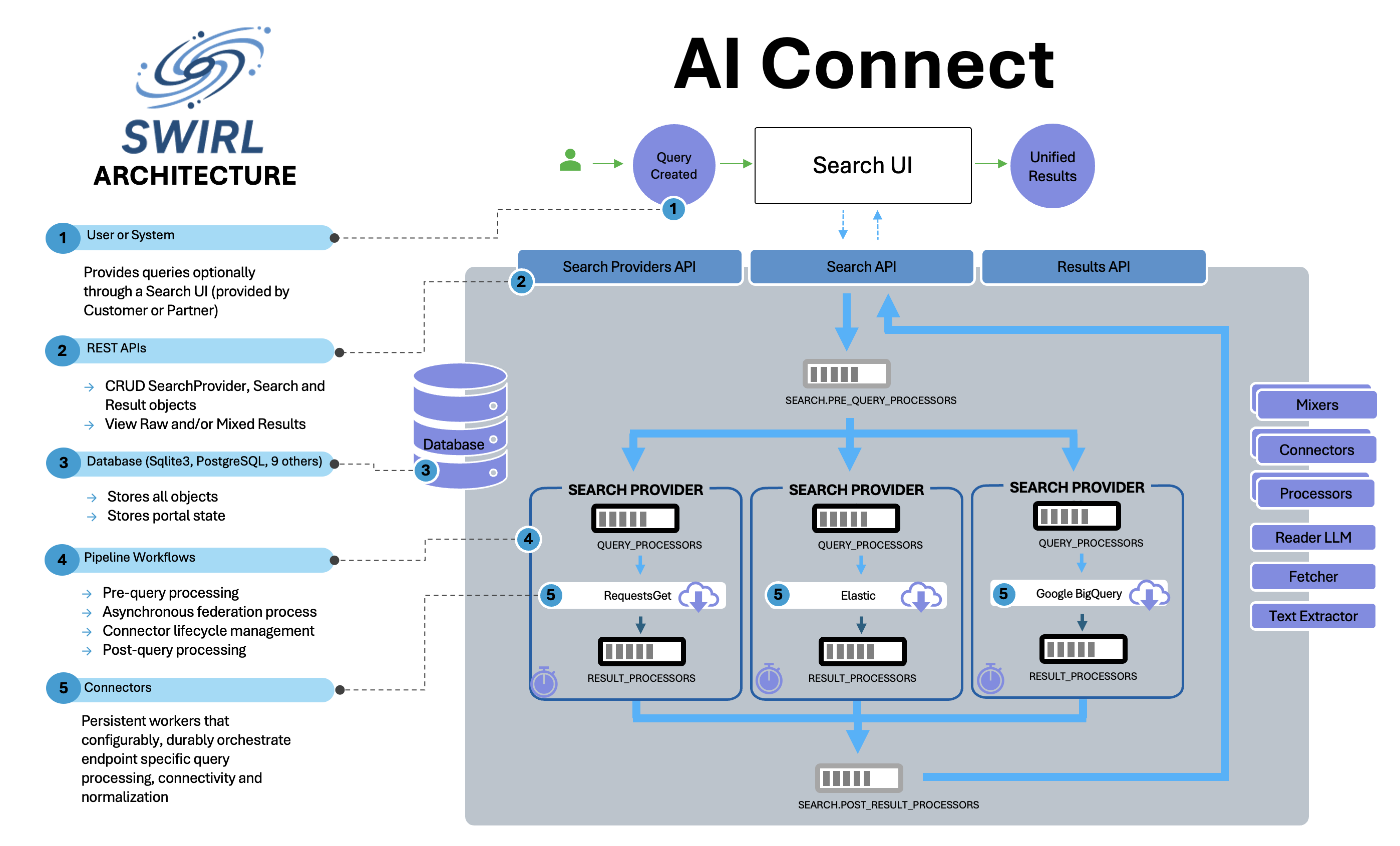
Processors execute in a sequence called a "pipeline." Pipelines are specified as JSON lists in their respective properties. SWIRL has four processing pipelines:
Search.pre_query_processorsSearchProvider.query_processorsSearchProvider.result_processorsSearch.post_result_processors
The System Default Post-Result Pipeline
In SWIRL 5, when Search.post_result_processors is empty (the default), the system-default Pipeline runs these stages, in order:
[
    "CosineRelevancyPostResultProcessor",
    "DedupeByFieldPostResultProcessor",
    "DedupeBySimilarityPostResultProcessor",
    "VersionClusteringPostResultProcessor"
]
This pipeline ranks results, removes exact and near duplicates, and clusters document versions. Edit the System Default Post-Result Pipeline in the Django Admin to change it.
Query Processors
Query Processors modify queries. The field they operate on depends on where they are deployed.
| Pipeline | Reads | Updates |
|---|---|---|
| Search.pre_query_processors | Search.query_string |
Search.query_string_processed |
| SearchProvider.query_processors | Search.query_string_processed |
<Connector>.query_string_to_provider |
Included Query Processors
| Processor | Description | Notes |
|---|---|---|
| AdaptiveQueryProcessor | Rewrites queries based on query_mappings for a given SearchProvider |
Not for pre_query_processors |
| GenAIQueryProcessor | Uses an LLM to rewrite queries, making them broader, more specific, boolean, or in another language | |
| GenericQueryProcessor | Removes special characters from queries | |
| SpellcheckQueryProcessor | Uses TextBlob to correct spelling errors | Best used in SearchProvider.query_processors; avoid with Google PSE |
| NoModQueryProcessor | Removes only leading SearchProvider Tags, leaving query terms unchanged | For repositories allowing non-search characters (e.g., brackets) |
| TransformQueryProcessor | Rewrites the query with configurable regex substitutions defined as paired SearchProvider tags (query_pattern:<regex> / query_replacement:<template>); the first matching rule wins |
SWIRL 5; pure configuration - no source-specific processor needed |
| RewriteQueryProcessor | Applies an uploaded rewrite-type Query Transformation CSV, referenced as <name>.rewrite |
|
| SynonymQueryProcessor | Applies an uploaded synonym-type Query Transformation CSV, referenced as <name>.synonym |
|
| SynonymBagQueryProcessor | Applies an uploaded synonym-bag-type Query Transformation CSV, referenced as <name>.bag |
|
| RemovePIIQueryProcessor | Removes PII entities from queries without replacing them | |
| RedactPIIQueryProcessor | Replaces PII entities in queries with type tags (e.g., <PERSON>) |
GenAIQueryProcessor
The GenAIQueryProcessor calls an LLM with the user's query and a custom prompt to enable rewriting, translation, phrase detection, and more.
Configuring the SearchProvider
To use the GenAIQueryProcessor with a specific SearchProvider, add it to the SearchProvider's query_processors list:
    "query_processors": [
        "AdaptiveQueryProcessor",
        "GenAIQueryProcessor"
    ]
To alter the query sent to all SearchProviders, add it to the Search.pre_query_processors list.
{
    "query_string": "<user-query-string>",
    "pre_query_processors": ["GenAIQueryProcessor"]
}
Note that the example above only applies to calling the SWIRL API. Please contact support for instructions on how to configure this behavior with the Galaxy UI.
Configuring the QueryProcessor
The GenAIQueryProcessor supports the same tags and configuration options as the GenAIConnector but using a colon (':') as a delimiter.
For example:
"tags": [
    "CHAT_QUERY_REWRITE_PROMPT:If this query is in Japanese, tokenize it, and output ONLY the tokenized japanese, NOTHING ELSE -> {query_string}",
    "CHAT_QUERY_REWRITE_GUIDE:You are a speedy tokenizer!",
    "CHAT_QUERY_DO_FILTER:False"
],
Result Processors
Result Processors transform source results into SWIRL format, as defined in swirl/processors/utils.py.
Included Result Processors
| Processor | Description | Notes |
|---|---|---|
| GenericResultProcessor | Copies results from source format to SWIRL format by exact name match | Use for sources that don’t require mapping |
| MappingResultProcessor | Maps results to SWIRL format using SearchProvider.result_mappings |
Default |
| LenLimitingResultProcessor | Truncates long title and body fields, appending an ellipsis ("..."). If truncated, stores full response in body_full in payload. Default limit: 512 characters, configurable via SearchProvider tag (max_length:256). |
Should follow MappingResultProcessor |
| CleanTextResultProcessor | Removes non-alphanumeric characters (e.g., HTML/Markdown syntax) | Should run before LenLimitingResultProcessor |
| DateFinderResultProcessor | Extracts dates from result body and assigns them to date_published if missing |
Detects formats like:06/01/23, jun 1, 2023, 06-01-2023 |
| AutomaticPayloadMapperResultProcessor | Identifies suitable title, body, and date_published values in source data |
Place after MappingResultProcessor. Use DATASET directive for single response storage in payload.dataset. |
| RequireQueryStringInTitleResultProcessor | Removes results lacking query_string_to_provider in the title |
Place after MappingResultProcessor. Default for "LinkedIn - Google PSE" |
| FetchURLForBodyResultProcessor | Fetches the result's full content from its URL (or the Page Fetcher content_url) and stores it in body |
Required for sources whose search response returns only titles or snippets (e.g., Box) |
| RedactPIIResultProcessor | Redacts PII in all result fields, including payload strings, replacing entities with tags (e.g., "James T. Kirk" → "<PERSON>") |
If applied before CosineRelevancyResultProcessor, PII terms won't affect ranking. Uses Presidio. |
| DedupeByFieldResultProcessor | Groups results from this source that share the same value in the field named by SearchProvider.result_grouping_field, returning one result per group |
Used by the M365 Outlook Messages SearchProvider (conversationId) |
| EntityExtractingResultProcessor | Extracts named entities from result fields using the reader LLM and stores them in the result's entities dictionary |
Fields to scan are configurable via the entity_fields SearchProvider tag |
Post Result Processors
PostResultProcessors modify stored result data. They operate only on processed results saved by each connector.
CosineRelevancyPostResultProcessor
SWIRL includes a cosine vector similarity relevancy model based on spaCy. The source code is found in swirl/processors/relevancy.py.
Relevancy Model
- Matches word stems using nltk.
- Scores fields defined in
SWIRL_RELEVANCY_CONFIGin swirl_server/settings.py. - Aggregates similarity of:
- Entire query vs. field (highest match in any sentence).
- Entire query vs. text window around field match.
- 1- and 2-word query combinations vs. text window around match.
- Weights fields as defined in
SWIRL_RELEVANCY_CONFIG. - Further weights window-text matches by match length.
- Provides a minor boost based on the original SearchProvider's rank:
- $1/(1+\sqrt{SearchProvider.rank})$
- Normalizes result length against the median of all results (
result_length_adjustinexplain). - Normalizes query length compared to all executed queries (
query_length_adjustinexplain).
Score Interpretation
The SWIRL score is relative: a higher score indicates greater contextual relevance. Scores are not comparable across queries.
Tip: To translate a score into confidence, set the highest result as 1.0, then divide other scores by it.
SWIRL provides:
- swirl_rank (1 to N, where N is total results).
- searchprovider_rank (rank assigned by the source).
Ties in relevancy ranking are broken by date_published and searchprovider_rank.
Relevancy Ranking Process:
1. SearchProvider.result_processors ranks results asynchronously per SearchProvider.
2. Search.post_result_processors finalizes ranking across results, adjusting for length and score normalization.
The CosineRelevancyPostResultProcessor must be included in Search.post_result_processors, after result mappings but before any processor dependent on swirl_score.
Example Configuration
"result_processors": [
    "MappingResultProcessor",
    "DateFinderResultProcessor",
    "CosineRelevancyResultProcessor"
]
Relevancy Implementation Notes
Implementation details of the relevancy pipeline that are useful when debugging scores:
- Sparse-vector detection. Before computing cosine similarity, the processor checks spaCy's
has_vectorandvector_normproperties; only genuinely vector-less inputs fall back to a constant score. NOTterm handling. When aNOTtoken flags a result in Pass 2 ofCosineRelevancyPostResultProcessor, only that result is suppressed; the provider's remaining results are scored normally.- Quoted-phrase relevancy. Quoted sub-strings in the query are detected before quote-stripping and prepended as highest-priority targets to both
query_stemmed_target_listandquery_target_list, so results matching the exact phrase outrank results that only match the scattered words. - Performance.
nlp(query)is computed once per search, not once per (result × field), and the cheapstem_string()+match_any()check runs before the expensive per-fieldnlp()call - fields with no stem overlap with the query skip NLP entirely.
Additional Post Result Processors
DropIrrelevantPostResultProcessor
Drops results with swirl_score < settings.MIN_SWIRL_SCORE (default: 500) and results lacking a swirl_score. Not enabled by default.
Note: Galaxy UI may not correctly display the result count when using this processor.
RedactPIIPostResultProcessor
Identical to RedactPIIResultProcessor, but processes all results in a search instead of per SearchProvider.
DedupeBySimilarityPostResultProcessor
Detects near-duplicates by similarity of title and body. By default (SWIRL_DEDUPE_GROUP_NOT_DROP=True) near-duplicates are grouped rather than dropped; the similarity threshold is SWIRL_DEDUPE_SIMILARITY_MINIMUM (default 0.95). Part of the system-default post-result Pipeline.
VersionClusteringPostResultProcessor
Clusters versions of the same document across sources (using the Semantic Cache's document signals), so the Galaxy UI can present one result per document with its versions grouped. Part of the system-default post-result Pipeline.
FetchURLPostResultProcessor
Fetches full content for results via the Page Fetcher after federation completes, across all providers in the search. Not enabled by default.
WriteToFileSystemPostResultProcessor
Writes the search's results to the local filesystem. Not enabled by default.
Mixers
Mixers organize search results into a structured order.
| Mixer | Description | Notes |
|---|---|---|
| RelevancyMixer | Sorts by relevancy score (descending), then source rank (ascending). | Depends on relevancy_processor in search.post_result_processors. |
| RelevancyConfidenceMixer | Sorts by the normalized confidence score (descending). | Default result_mixer in SWIRL 5. |
| RelevancyNewItemsMixer | Same as RelevancyMixer, but hides results missing the new field from Search updates. |
Default for search.new_result_url. |
| DateMixer | Sorts by date_published. Omits results with "unknown" dates. |
Use for date-sorted results. |
| DateNewItemsMixer | Same as DateMixer, but hides results missing the new field. |
Default for search.new_result_url when sorting by date. |
| RoundRobinMixer | Alternates results from each SearchProvider; equivalent to Stack1Mixer. |
Good for cross-sectioned results or date sorting. |
| Stack1Mixer | Alternates results from each SearchProvider, one at a time. | Good for cross-sectioned data. |
| Stack2Mixer | Alternates results, taking two per SearchProvider. | Good for 4-6 sources. |
| Stack3Mixer | Alternates results, taking three per SearchProvider. | Good for few sources. |
| StackNMixer | Alternates results, taking N per SearchProvider (default: results requested ÷ number of providers responding). |
Good for fewer providers. |
Date Mixer
For date_published-sorted results, use DateMixer.
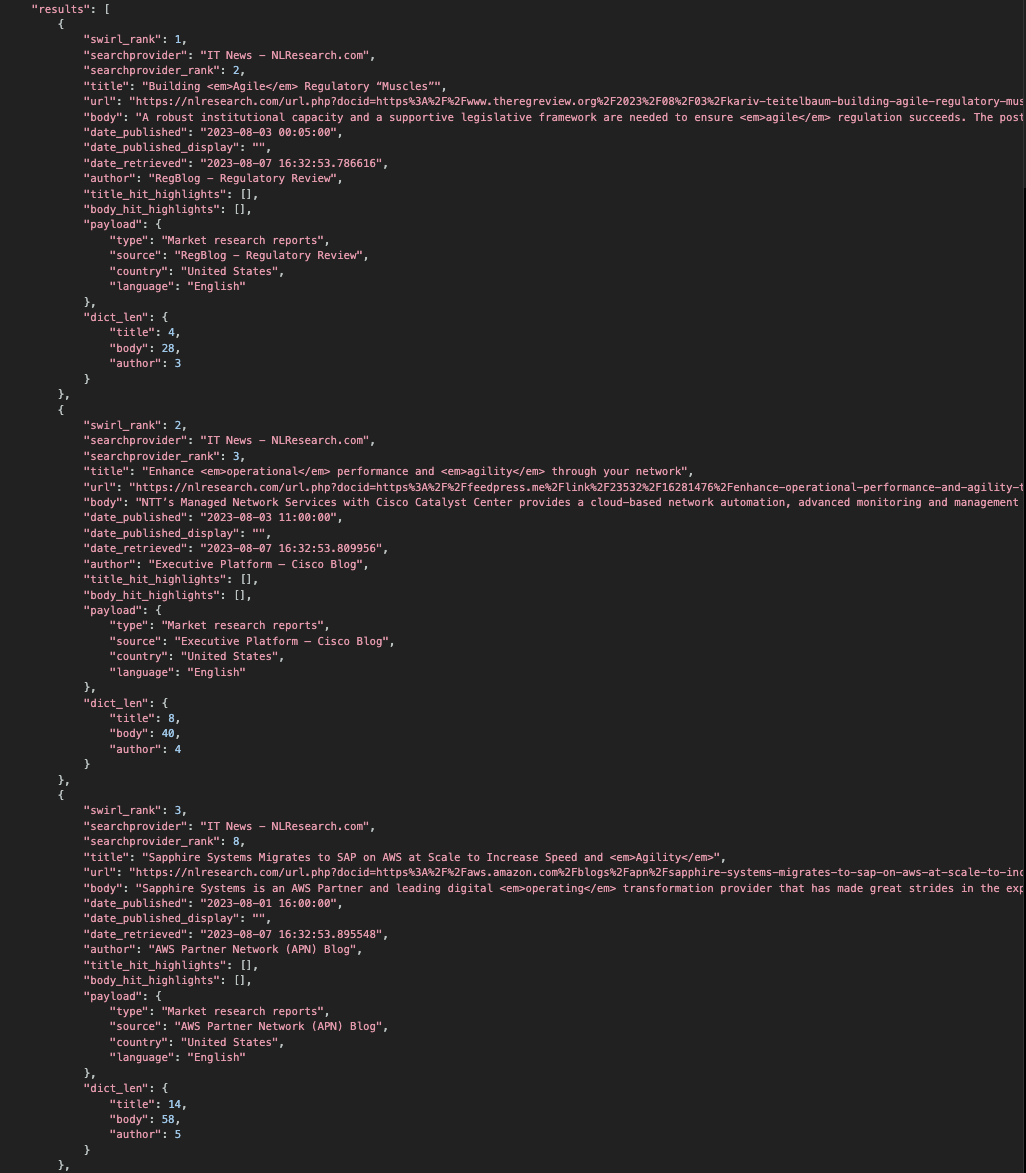
Example:
http://localhost:8000/swirl/results?search_id=1&result_mixer=DateMixer
NewItems Mixers
NewItems Mixers filter results to only those with the new field. They also report hidden results.
To mark all results as "read" (removing new status), add &mark_all_as_read=1:
http://localhost:8000/swirl/results/?search_id=1&result_mixer=DateNewItemsMixer&mark_all_as_read=1
The mixer will then return 0 results but will return new results when the search updates.
Using Mixers
Mixers combine and order Result objects. For example:
- Stack1Mixer alternates between sources.
- DateMixer sorts by date_published.
To apply the default Mixer:
http://localhost:8000/swirl/results/?search_id=1
To specify a different Mixer, append &result_mixer=mixer-name:
http://localhost:8000/swirl/results/?search_id=1&result_mixer=Stack1Mixer
Mixer Response Format
| Field | Description |
|---|---|
| messages | All messages from the Search and SearchProviders. |
| info | Found/Retrieved counts per SearchProvider. |
| info - search | Search metadata, processed query, re-run links, and re-score links. |
| info - results | Result count, next/previous page URLs. |
| results | Mixed results from the search. |
Sample Data Sets
Funding Data Set
The TechCrunch Continental USA funding data set is sourced from Insurity SpatialKey. It is included in SWIRL as Data/funding_db.csv and processed with DevUtils/fix_csv.py before loading into SQLite3.
Loading into SQLite3
- Activate sqlite_web from the
swirl-homedirectory:
sqlite_web db.sqlite3
- Open http://localhost:8080/ in a browser if it does not open automatically.
- Enter
"funding"in the text box in the upper right and clickCreate. - Click
Choose Fileand select Data/funding_db.csv. - Leave "Yes" in the confirmation box.
- Click
Import.
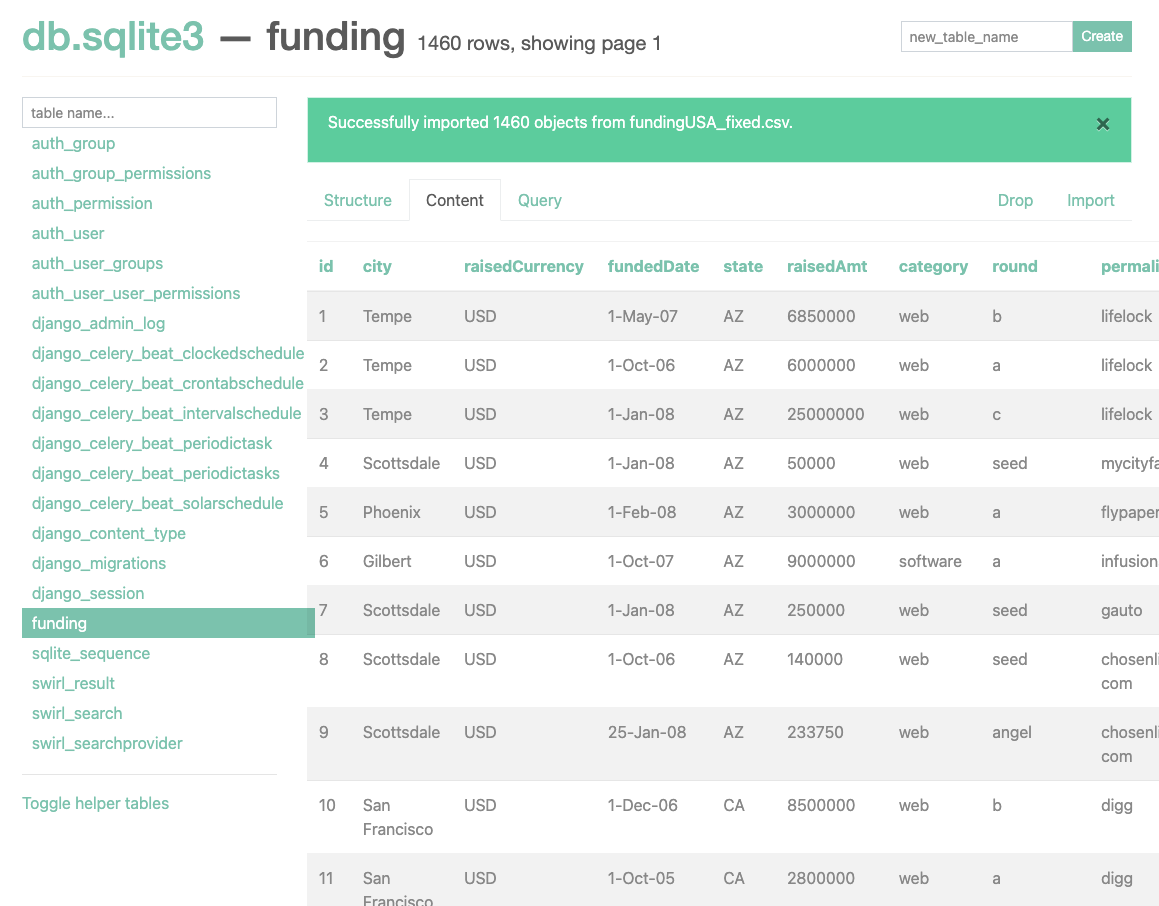
- Load the Funding DB SQLite3 SearchProvider as described in the SearchProvider Guide.
Loading into PostgreSQL
- Create a table using SQL or Postico:
CREATE TABLE funding (
    id INTEGER GENERATED ALWAYS AS IDENTITY PRIMARY KEY,
    permalink TEXT,
    company TEXT,
    numemps TEXT DEFAULT '0',
    category TEXT,
    city TEXT,
    state TEXT,
    fundeddate DATE,
    raisedamt NUMERIC DEFAULT '0',
    raisedcurrency TEXT,
    round TEXT
);

CREATE UNIQUE INDEX funding_pkey ON funding(id);
- Import the CSV:
COPY funding(permalink,company,numemps,category,city,state,fundeddate,raisedamt,raisedcurrency,round)
FROM '/path/to/Data/funding_db.csv'
DELIMITER ',' CSV HEADER;
- Load the Funding DB PostgreSQL SearchProvider as described in the SearchProvider Guide.
Loading into BigQuery
- Create a table with the following schema:
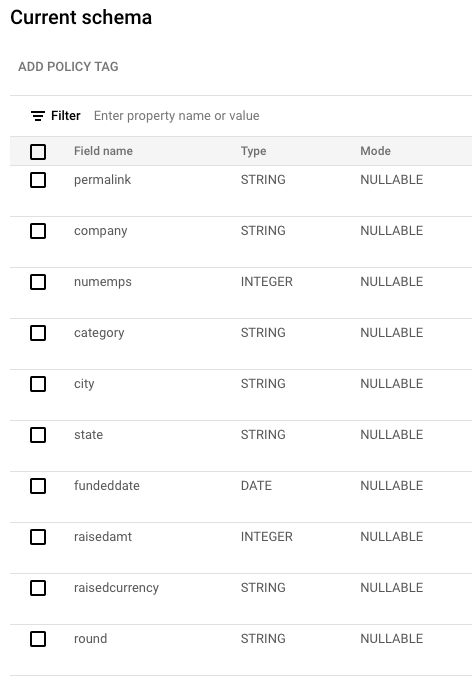
- Load the CSV using Google's BigQuery CSV Import Guide.
- Load the Funding DB BigQuery SearchProvider as described in the SearchProvider Guide.
Enron Email Data Set
This dataset includes 500,000+ emails from 150 former Enron employees. It is available on Kaggle and Carnegie Mellon.
Loading into Elastic or OpenSearch
- Download and extract the Enron email dataset.
- Move
emails.csvto yourswirl-homedirectory. - Create a new index named
'email'using the Elastic/OpenSearch console:
PUT /email
To index Enron data into Elastic, update the load script to include a valid certificate path.
- Modify
DevUtils/index_email_elastic.py(line 37):
## Insert path to Elastic cert below
ca_certs = "<PATH-TO-CERT>"
- Index the emails:
For Elastic:
python DevUtils/index_email_elastic.py emails.csv -p elastic-password
For OpenSearch:
python DevUtils/index_email_opensearch.py emails.csv -p admin-password
- Verify the index in the development console:
GET _search
{
  "query": {
    "match_all": {}
  }
}
Example Response:
{
  "took": 38,
  "timed_out": false,
  "_shards": {
    "total": 6,
    "successful": 6,
    "skipped": 0,
    "failed": 0
  },
  "hits": {
    "total": {
      "value": 6799,
      "relation": "eq"
    },
    "max_score": 1.0,
    "hits": [
      {
        "_index": "email",
        "_id": "c13MwoUBmlIzd81ioZ7H",
        "_score": 1.0,
        "_source": {
          "url": "allen-p/_sent_mail/118.",
          "date_published": "2000-09-26 09:26:00.000000",
          "author": "<name>",
          "to": "<email-address>",
          "subject": "Investment Structure",
          "content": "---------------------- Forwarded by ..."
        }
      }
    ]
  }
}